DEPARTMENTAL SEMINAR28 OCTOBER 2026
AI PRACTICE · 10 MIN FULLMAG · 30 MIN

AI in Research
& FullMag

Practical AI workflows.
A platform for micromagnetic simulation.

FullMag logo

FDM · FEM · EIGENMODES

Mateusz Zelent1,2

Mateusz Gołębiewski2 · Uladzislau Makartsou2 · Philipp Pirro1

1 RPTU Kaiserslautern–Landau
Department of Physics & OPTIMAS

2 Adam Mickiewicz University, Poznań
Institute of Spintronics and Quantum Information

QR code linking to this presentationPresentation available:
presentations.mzelent.pl
/28102026/ai.html
AI · MODEL NAMESA1b

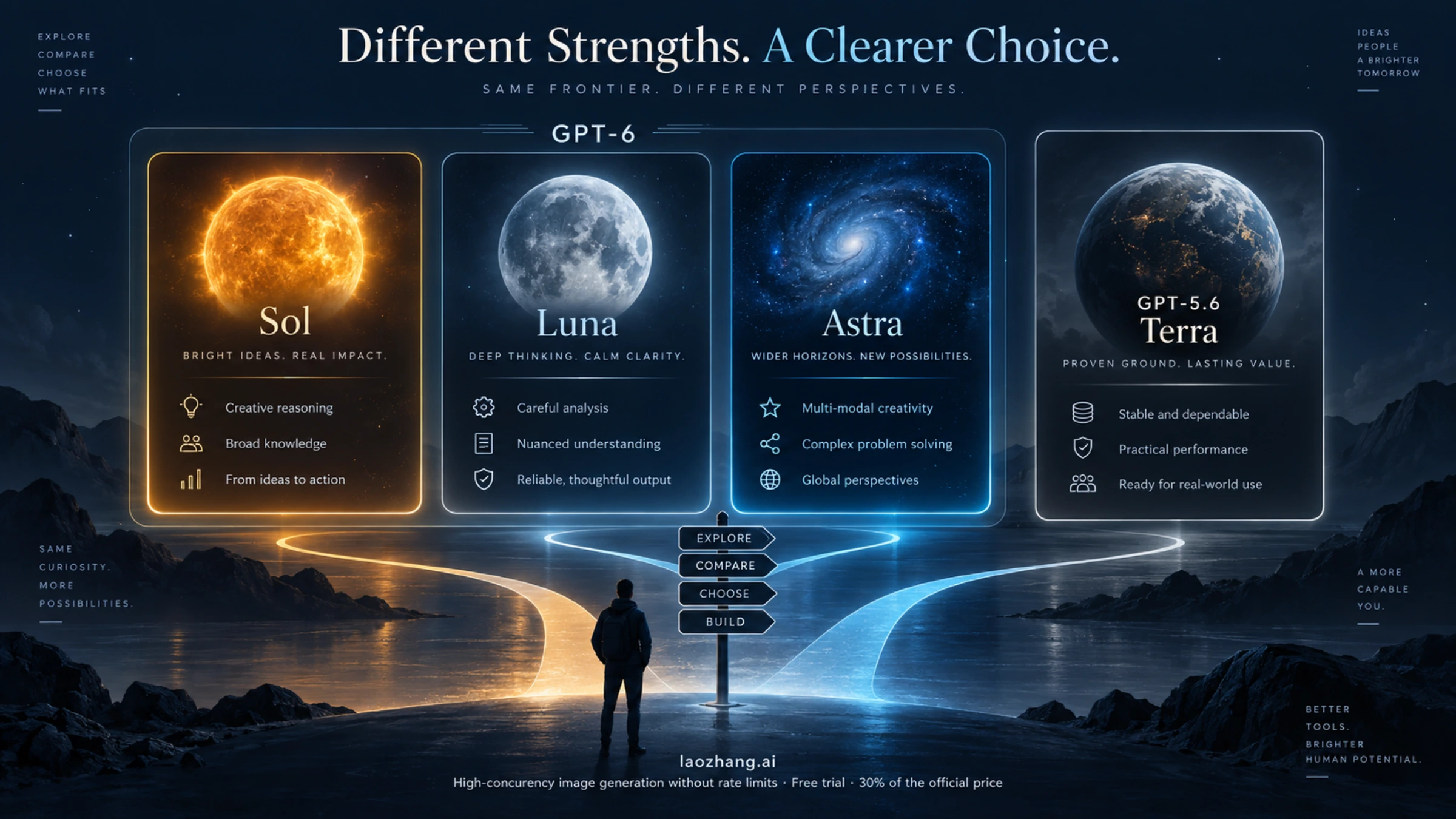
Sol, Luna, Astra, Terra: a visual introduction

User-supplied illustration associating Sol, Luna, Astra and Terra with celestial imagery

Illustration, not an official capability ranking. Use the next slides for model selection and reasoning settings.

AI · PRACTICAL RESEARCH WORKFLOWA2

Know the model families — then pick the task

A provider, a model, a reasoning setting and a subscription are different choices.

ProviderEfficient / focusedEveryday workDemanding work
OpenAIGPT-6 Luna MAX
Extraction, repeated edits
GPT-6.1 Terra: visual work / writing
GPT-6.1 Sol: analysis / coding
GPT-6 Astra
Difficult synthesis and decisions
AnthropicHaiku 5.5
Fast, bounded tasks
Sonnet 5.5 · general work
Opus 5.5 · demanding agent work
Fable 5.1
Frontier coding / agentic work
GoogleGemini 3.5 Flash-Lite · routine intakeGemini 3.8 Flash · general agent workGemini 4 Argon · flagship; 3.1 Pro Preview · preview

Starting recommendations — validate on your own papers, scripts and numerical checks.

AI · PRACTICAL RESEARCH WORKFLOWA2b

Choose the model — then choose how hard it thinks

Reasoning effort trades response time and token use for deeper analysis.

Claude · model → Effort
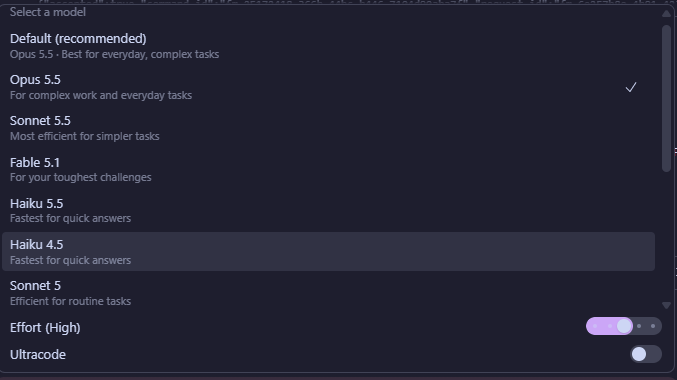
Claude model menu showing Effort High

Choose the model, then adjust Effort.
The screenshot shows High.

ChatGPT / Work · model + reasoning

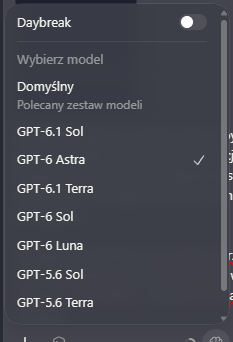
OpenAI model menu; reasoning setting is not visible in this screenshot

Luna: MAX. Others: start with the default.

Where available: Power → Advanced to set model and reasoning effort.

Move toward Smarter for deeper analysis; Faster for routine work.

This capture shows model selection only. Controls vary by client and plan.

Low / fasterDOI extraction, formatting, small edits
Default / mediumRoutine analysis, scripts, manuscript edits
Higher effortDerivations, difficult bugs, conflicting evidence

For Luna, always choose MAX. For other models, adjust effort to the task and check quality, time and usage.

OPTIONAL · AX3 · SUPPORTING DETAILSkip extras →

Chat controls and Work model names are not identical

Select the actual model and effort; a prompt saying “think harder” is not a settings change.

SurfaceWhat to choosePractical use
ChatGPT ChatGPT-6 thinking slider; eligible Pro uses AstraBounded analysis, explanation and research
ChatGPT Work / CodexAstra / Sol / Terra: choose effort; Luna: always MAXFiles, applications and project execution
Claude / Claude CodeAvailable family and effort in the account selectorSame task contract; different tool access
Gemini app / APIApp mode or exact API model IDDo not equate a subscription name with a model

Pro subscription ≠ Pro model / effort ≠ Deep Research. Availability varies with plan, client and rollout.

AI · PRACTICAL RESEARCH WORKFLOWA3

Which model should a researcher use?

Route the work by difficulty and cost of error.

Research taskStarting choiceEscalate when…
Extract DOI, units or table fieldsLuna MAX / Haiku / Flash-LiteThe source is ambiguous or multimodal
Rewrite a paragraph; inspect figuresTerra / Sonnet / FlashMeaning, evidence or notation conflicts
Debug analysis; compare methodsSol / Opus / Gemini ProThe cause spans files or assumptions
Derive a model; challenge a research planAstra / Fable / Argon; bounded strong reasoningAn independent check still finds contradictions
One workflow can use several models: strong planner → economical executor → focused independent check.
AI · PRACTICAL RESEARCH WORKFLOWA4

Set your research defaults once

Personality controls tone. Instructions define the working rules.

Where to set them

ChatGPT: Settings → Personalization → Base style and tone / custom instructions.

Claude: profile preferences, response styles and project instructions.

Project: keep symbols, methods and constraints with the project.

A useful researcher preset

Use concise scientific English and SI units. Preserve citation keys and uncertainty. Separate evidence from interpretation. Never invent references or measurements. Flag missing sources and check limiting cases.
AI · PRACTICAL RESEARCH WORKFLOWA4b

My usage: what would the API equivalent cost?

A transparent estimate using GPT-6.1 Sol — the model I use most.
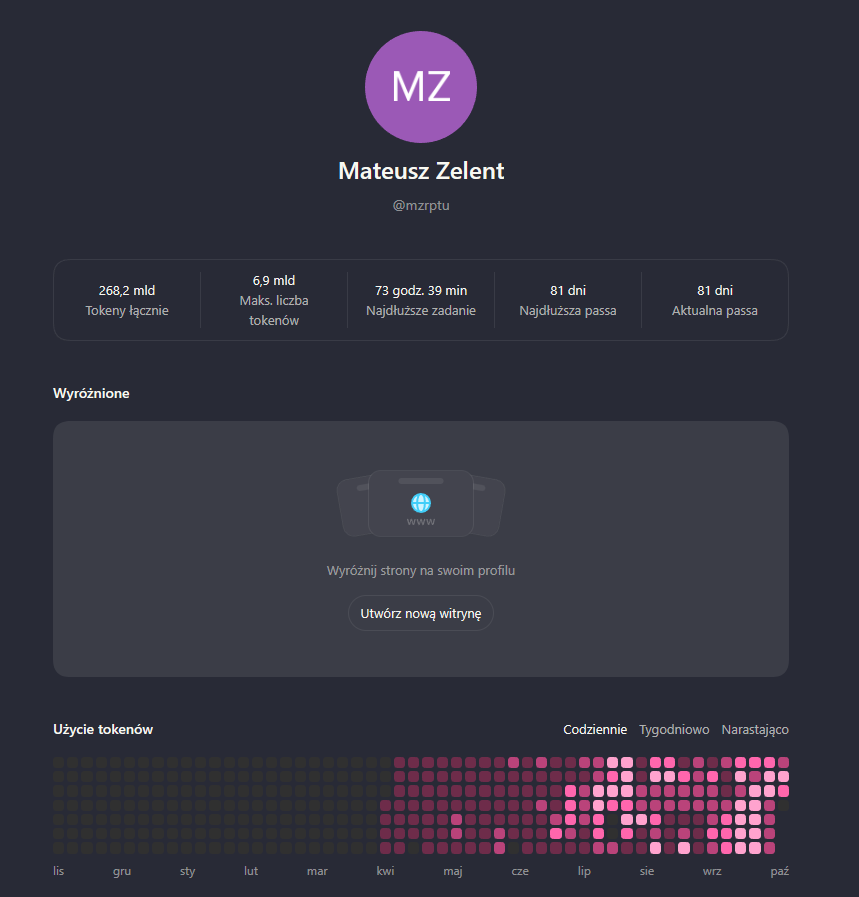
Mateusz Zelent account profile showing 268.2 billion total tokens
268.2 billion tokens

Displayed account total · mostly Sol, according to the author.

What if these were GPT-6.1 Sol API tokens?

Illustrative token mixEstimated cost
90% input / 10% output · no cache$751k
90% input / 10% output · 90% input cache hits$350k
99% input / 1% output · 90% input cache hits$117k

USD / 1M: input $2 · output $10 · cache read $0.10 · 30-minute cache write $2.50.

Estimates, not a bill. Standard tier; ≤272K input/request. Cached variants count misses as cache writes. Excludes tools and tax.

Official API pricing · checked 28 Oct 2026
OPTIONAL · AX1 · SUPPORTING DETAILSkip extras →

API prices: OpenAI and Anthropic

USD per 1M tokens · standard direct API · checked 28 October 2026

ModelInputOutputCached input
GPT-6 Luna$0.10$0.50$0.01
GPT-6.1 Terra$1$5$0.05
GPT-6.1 Sol$2$10$0.10
GPT-6 Astra$10$50$1
Claude Haiku 5.5$0.10$0.50$0.01
Claude Sonnet 5.5$2$10$0.10
Claude Opus 5.5$4$20$0.20
Claude Fable 5.1$10$50$0.25

OpenAI: ≤272K input tokens. Haiku: ≤100K total prompt; above this, input/output becomes $0.50/$2.50. Tools, cache writes and other tiers are extra.

OPTIONAL · AX2 · SUPPORTING DETAILSkip extras →

API prices: the current Gemini lineup

Current paid Developer API text rates · promotional changes are explicit.

ModelInput / output per 1MStatus / condition
Gemini 4 Argon$2 / $10Introductory through 30 Nov 2026; then $4 / $20
Gemini 3.8 Flash$0.75 / $3.75Introductory through 31 Dec 2026; then $1.50 / $7.50
Gemini 3.5 Flash-Lite$0.30 / $2.50Stable
Gemini 3.1 Pro Preview$2 / $12≤200K prompt; above: $4 / $18
Gemini 3.1 Flash-Lite$0.25 / $1.50Earlier stable option; text / image / video

Thinking is included in billed output. Caching, storage and grounding have their own accounting. App subscriptions use separate access rules.

AI · PRACTICAL RESEARCH WORKFLOWA5

Use memory for continuity — files for exact facts

Carry preferences forward without turning recollection into evidence.

Worth remembering

  • Your field, preferred language and notation
  • How the group reviews a manuscript
  • Recurring project conventions

Ask: “What do you remember about this project?” Correct stale details.

Keep in versioned files

  • Material parameters and units
  • Accepted derivations and source passages
  • Current decisions and unresolved questions

Use: CONTEXT.md, DECISIONS.md, references.bib.

ChatGPT web memory and local Codex memory are separate stores. Do not assume automatic transfer to VS Code.

AI · PRACTICAL RESEARCH WORKFLOWA6

A skill is a reusable laboratory procedure

Instructions + reference material + optional scripts — loaded when relevant.

Example: manuscript claim audit

  1. Read the manuscript and cited sources.
  2. Extract claims with line or section locations.
  3. Match each claim to a source passage.
  4. Return supported / overstated / unsupported.
  5. Preserve the original; propose a diff.

What goes in the skill

claim-audit/
  SKILL.md
  references/checklist.md
  assets/audit-template.csv
  scripts/check_citations.py

Different roles: skill = procedure; project = context; connector = access; model = reasoning engine.

Test the procedure on one known manuscript before reusing it across the group.

OPTIONAL · AX8 · SUPPORTING DETAILSkip extras →

Where should a reusable instruction live?

Keep style, memory, project rules and skills separate.

NeedChat / applicationLocal project
Preferred language and tonePersonal preferences / stylePersonal agent instructions
Remember recurring contextMemory, if enabled and in scopeCodex host memory / Claude Code auto memory
Enforce project conventionsProject instructions and knowledgeAGENTS.md / CLAUDE.md; checked-in methods
Repeat a procedureSupported skill / custom assistant / GemSKILL.md with references and scripts

Chat history, local memory and project files are not automatically synchronized across products.

AI · PRACTICAL EXAMPLESA6b

A small skill kit for a research group

Use one skill for a specific stage; these are available examples, not universal built-ins.

SkillWhen to invoke itUseful result
idea-refine · brainstorming ↗An idea is still vagueAlternative directions + assumptions + smallest test
planning-and-task-breakdown ↗The direction is chosenOrdered tasks, dependencies and acceptance checks
debugging-and-error-recovery ↗A script or numerical result is wrongReproduction → cause → targeted fix → verification
code-review-and-quality ↗Before trusting an analysis changePrioritized findings with file locations and evidence
source-driven-development ↗Using an unfamiliar library / APIImplementation grounded in official documentation
claim-audit · included template ↗Checking a manuscript draftClaim–source table; unsupported claims flagged
OPTIONAL · AX12 · SUPPORTING DETAILSkip extras →

Find a skill by the task you need done

Discover → inspect the source → install selectively → test on a small example.

1 · Search and inspect

Browse skills.sh ↗ or ask an available find-skills skill ↗.

npx skills find brainstorming
npx skills find literature review

Read SKILL.md, scripts, dependencies and license. Check author and maintenance. Popularity alone is not a quality guarantee.

2 · Choose one skill

npx skills add addyosmani/agent-skills --list

npx skills add addyosmani/agent-skills --skill idea-refine

Run in your project; select the intended agent. Then ask it to list available skills and use the exact installed name.

CLI setup and current commands ↗

“Find a skill for checking manuscript claims against source PDFs. Compare three options by source, workflow, dependencies and output. Show links before installing anything.”
REFERENCE · NODE.JS REQUIRED FOR THE CLILocal agent skills ≠ automatically installed ChatGPT/Gemini app featuresQR code for this presentationPresentation available:
AI · PRACTICAL EXAMPLESA6c

Brainstorming: turn an idea into a testable direction

Example: idea-refine ↗ · Alternative: Superpowers brainstorming ↗

Prompt to copy

Use the available idea-refine skill. We want to study spin-wave confinement in a YIG waveguide. We have four weeks, existing simulation tools and no new measurements.

Ask up to three clarifying questions. Propose five distinct directions. Compare scientific value, feasibility and the hardest assumption. After I choose, propose the smallest discriminating test.

What the skill adds

  1. Opens alternatives before committing.
  2. Challenges assumptions and weak ideas.
  3. Turns the selected idea into a short brief.

Expected output: comparison table → chosen hypothesis → test and failure criterion.

Novelty is a hypothesis until checked against literature.

AI · PRACTICAL RESEARCH WORKFLOWA7

Chat → research package → Work / Code

Use deep analysis to produce a handoff that another agent can execute.

1 · Explore in Chat

Use Pro / strong reasoning for a bounded derivation. Use Deep Research for source discovery and synthesis.

→

2 · Export the evidence

brief.md
methods.md
evidence.csv
references.bib
open_questions.md
report.pdf
→

3 · Continue with files

Download a ZIP, inspect it, open the folder in VS Code or attach it to Work.

Implement one specific analysis or revision.

“Read brief.md and methods.md. Implement only Figure 2. Preserve inputs. Run unit and limit checks; return the diff and reproduction command.”
OPTIONAL · AX7 · SUPPORTING DETAILSkip extras →

A portable research handoff

Download the templates; replace the examples with your verified project facts.

Before leaving Chat

brief.md
accepted_methods.md
evidence.csv
references.bib
open_questions.md
README.md

PDF for reading · editable sources for execution · ZIP for transport.

First prompt in VS Code

Read the brief and source manifest. List missing inputs. Implement only the agreed analysis. Preserve raw data. Return a diff, reproduction command and checks actually run.

Download the researcher starter pack

AI · PRACTICAL RESEARCH WORKFLOWA8

VS Code is a research workspace, not just a code editor

Put the manuscript, data, scripts, figures and agent in one reviewable project.
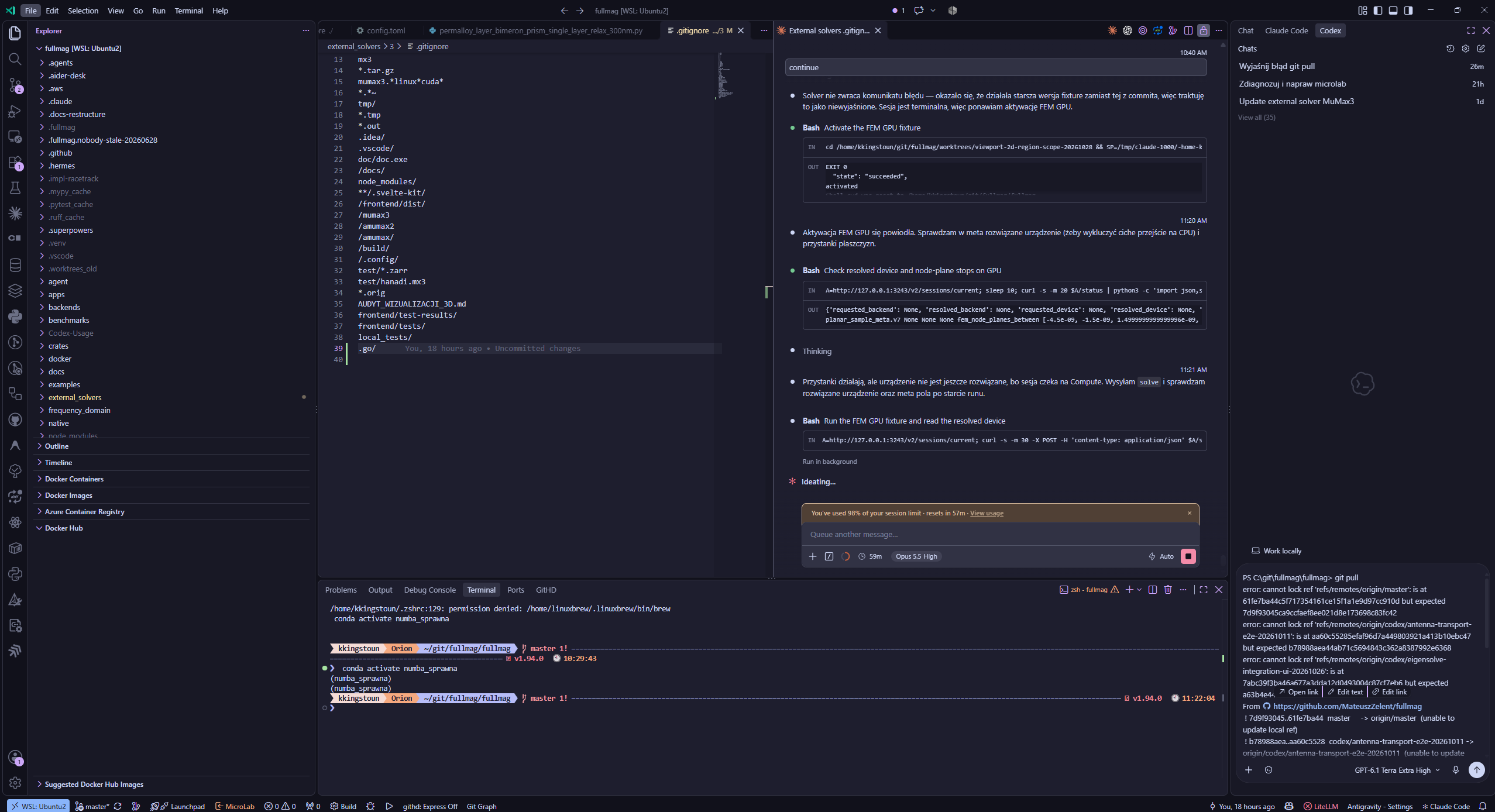
User-provided Fullmag VS Code workspace with Claude Code and Codex

A practical loop

  1. Open the project folder.
  2. Reference only relevant files.
  3. Ask for one bounded change.
  4. Inspect the diff and test output.

Use Codex or Claude Code; the extensions and memory scopes are distinct.

Optional: Claude Code + Overleaf tutorial →

OPTIONAL · AX10 · SUPPORTING DETAILSkip extras →

Prompt: implement one analysis in VS Code

Attach the raw data, units, method and one known reference case.

Read brief.md, dispersion.csv and units.md. Write a script that plots frequency in GHz against wave number in rad/µm. Preserve the raw CSV. Use only the analytical expression supplied in methods.md; flag undefined parameters before implementation.

Return the code diff, figure and reproduction command. Check missing columns, unit conversions and the k = 0 limit against the supplied reference. Report checks actually run, and label anything you could not verify.

Acceptance: rerun the command, inspect units and independently check the reference value. A plausible-looking plot is not validation.

OPTIONAL · CT1 · CLAUDE + OVERLEAF Skip tutorial →

Choose a handoff you can review

Start from a clean copy of the Overleaf source and keep the original recoverable.

Source ZIP · broadest access

  1. Overleaf: File → Download as source (.zip).
  2. Extract into a new local working folder.
  3. Work on that copy; upload it as a new Overleaf project.

The source ZIP does not include the compiled PDF.

Git · when enabled for the project

  1. Overleaf Git integration is a premium feature.
  2. Clone or pull the project, then review locally.
  3. Direct Overleaf Git has one branch: usually main for new clones.

Confirm remote + branch. Git pushes can displace active comments or Track Changes.

OPTIONAL · CT2 · CLAUDE + OVERLEAF Skip tutorial →

Install the interface you want to use

VS Code extension for an editor panel, or the CLI for a terminal session.

VS Code extension

  1. Open Extensions: Cmd/Ctrl + Shift + X.
  2. Find Claude Code and install it.
  3. Open your manuscript folder, then the Claude panel.
  4. Sign in when prompted.

Requires VS Code 1.94 or later.

CLI · native install

# macOS / Linux / WSL
curl -fsSL https://claude.ai/install.sh | bash

# Windows PowerShell
irm https://claude.ai/install.ps1 | iex

Open a new terminal after installation; sign in on first run.

OPTIONAL · CT3 · CLAUDE + OVERLEAF Skip tutorial →

Initialize context from inside the session

Terminal commands start the tool; slash commands control a running conversation.

Terminal · before the session

cd /path/to/paper
claude

Open the prompt in the manuscript’s project directory.

Claude Code · after it opens

/init

Review the proposed starter CLAUDE.md before you rely on it.

Use /init in the session — not claude init in the shell.

OPTIONAL · CT4 · CLAUDE + OVERLEAF Skip tutorial →

Keep the project rulebook short and testable

Put stable manuscript conventions and boundaries in the project’s CLAUDE.md.

Starter example

# Paper workflow
- Main file: main.tex
- Bibliography: refs.bib
- Preserve claims, values, units, and cite keys.
- Never invent data or references.
- Edit only the requested section.
- Ask before changing figures or .bib files.

Replace the example filenames with this project’s real files.

Write rules that can be checked

  • Name the main TeX file and bibliography.
  • State what may change and what must stay fixed.
  • Ask for a diff and a compile check.
  • Keep personal preferences out of shared project rules.
OPTIONAL · CT5 · CLAUDE + OVERLEAF Skip tutorial →

Make one repeatable edit into a local skill

A project skill is a Markdown workflow Claude can discover or you can invoke by name.

Create this file

.claude/skills/revise-paragraph/SKILL.md

---
name: revise-paragraph
description: Revise one selected paragraph for clarity while preserving its meaning.
---
1. Edit only the named paragraph.
2. Preserve claims, numbers, units, and cite keys.
3. Add no sources; show a diff first.

Discover and invoke

/reload-skills
/skills
/revise-paragraph

Use the skill list to confirm what this project exposes.

For external discovery, browse skills.sh ↗; treat entries as third-party candidates.

OPTIONAL · CT6 · CLAUDE + OVERLEAF Skip tutorial →

Start with one paragraph and a clear stop point

Ask for an evidence-bound edit that is easy to compare with the source.

“Revise only the Results paragraph in sections/results.tex. Preserve every scientific claim, number, unit, and citation key. Add no sources or data. Show a diff and wait for my approval before applying the edit.”

Replace the path with a real section. You remain responsible for the scientific interpretation.
OPTIONAL · CT7 · CLAUDE + OVERLEAF Skip tutorial →

Review the diff, then compile the manuscript

A clean build checks syntax and references; it does not validate the science.

Inspect what changed

/diff
  • Confirm only the intended files changed.
  • Check equations, values, units, and citation keys.

Compile and inspect the PDF

# local TeX installation
latexmk -pdf main.tex

Or click Recompile in Overleaf. Check the PDF and build log.

OPTIONAL · CT8 · CLAUDE + OVERLEAF Skip tutorial →

Return only a reviewed copy

Keep ZIP handoffs separate; send Git changes to the confirmed target.

ZIP → new Overleaf project

  1. Package the reviewed source files.
  2. New Project → Upload Project.
  3. Recompile and inspect the new project.

The original project remains a separate project.

Git → confirmed remote + branch

  1. Clean status; pull confirmed main/master.
  2. Review diff, compile, commit named files only.
  3. Fetch, sync, review again; push without force.

New clones use main; older ones may use master. Full command sequence →

If the push is rejected or conflicts appear: stop, sync, review again. Never force-push a manuscript handoff.

Complete tutorial, copyable examples & official sources →
AI · PRACTICAL RESEARCH WORKFLOWA9

Prompts and attachments: make the output testable

One concrete manuscript request is more useful than “improve my paper”.

Attach an evidence pack

  • manuscript.tex — editable source
  • references.bib + PDFs — citation evidence
  • results.csv + units — numerical truth
  • figures + captions — visual context

Ask the agent to list files it could actually read.

Request a bounded change

Revise the Introduction only. Preserve scientific claims, uncertainty and citation keys. Return a diff and a claim–source table. Mark unsupported claims; do not invent references.
AI · PRACTICAL EXAMPLESA9b

Bad prompt / Good prompt

The same task — a vague request versus clear instructions you can verify.

Bad prompt

Improve my paper.

No target section, source of truth, permitted changes or review format.

Attach

Introduction.tex
references.bib
the cited PDFs

Good prompt

Revise only Introduction.tex for clarity; keep it under 700 words. Preserve scientific claims, uncertainty, equations and citation keys.

Use the attached papers as evidence. Flag unsupported claims with the source passage or “source missing”.

Return a diff and a claim–source table. List unreadable files. Check that every citation key exists in references.bib.

OPTIONAL · AX9 · SUPPORTING DETAILSkip extras →

Prompt: literature review with traceable evidence

Attach your question, inclusion criteria, seed papers and search cutoff.

Find studies comparing finite-difference and finite-element methods for spin-wave dispersion in confined waveguides. Search through [date]. Include primary papers with an explicit geometry, material parameters and a numerical or experimental reference. Exclude papers that only mention the methods.

Return a table: citation / DOI, geometry, method, validation, limitations and supporting page or passage. Separate full texts you inspected from abstract-only records. Do not invent missing values. End with unresolved questions and a reproducible search log.

Acceptance: verify DOI/title matches and inspect the source passages for three key claims. A search is not necessarily exhaustive.

AI · PRACTICAL RESEARCH WORKFLOWA10

Count the whole task — not just the prompt

API tokens, subscription allowance and benchmark cost are different measures.

Illustrative API calculation

20,000 input + 5,000 billed output tokens
No cache, tools or retries

OpenAI modelEstimated text cost
Luna MAX$0.0045
Terra$0.045
Sol$0.09
Astra$0.45

What increases actual usage

  • Repeated context and large tool outputs
  • Reasoning tokens and long answers
  • Retries, delegation and review
  • Search, execution and storage charges

Measure: cost per accepted result, plus your review time.

OPTIONAL · AX11 · SUPPORTING DETAILSkip extras →

Prompt: challenge a result before submission

Attach the derivation, assumptions, figure and numerical settings.

Review the attached derivation and dispersion comparison as a critical colleague. Separate algebra, dimensions, physical assumptions and numerical error. Check boundary conditions, k = 0 and the stated limiting case.

Return findings ordered by scientific impact, each with a source location, explanation and a concrete test. Do not silently fix the derivation. Distinguish a confirmed error from a question requiring more evidence. Suggest the single most informative next check.

Acceptance: resolve each material finding with an independent calculation or source; agreement between models is not sufficient.

AI · PRACTICAL RESEARCH WORKFLOWA11

Quality and cost: three complementary comparisons

Read each score together with its task, reasoning setting and cost definition.
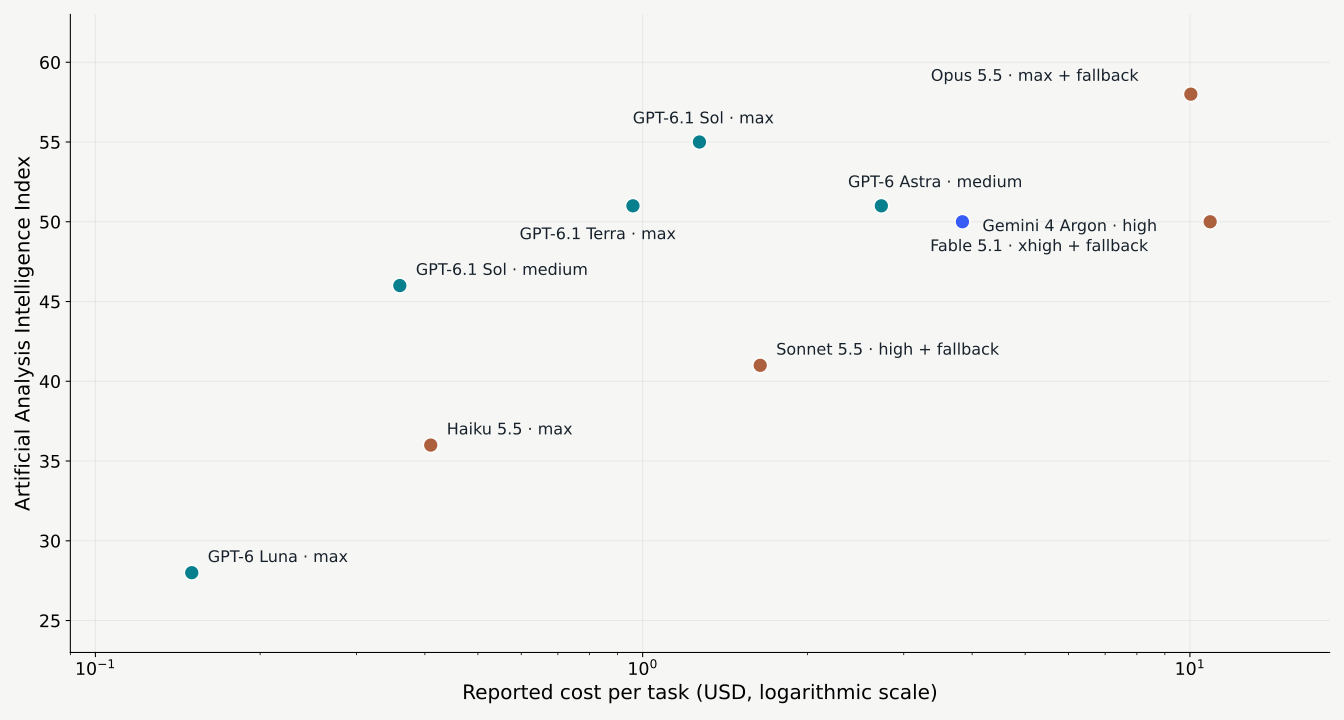
Different tests and cost definitions — compare within each chart. Full-size views follow immediately.

AI · QUALITY, REASONING & COSTA11b

Reasoning effort: compare the gain with the cost

ARC-AGI-1 · abstract visual reasoning · score versus cost per task
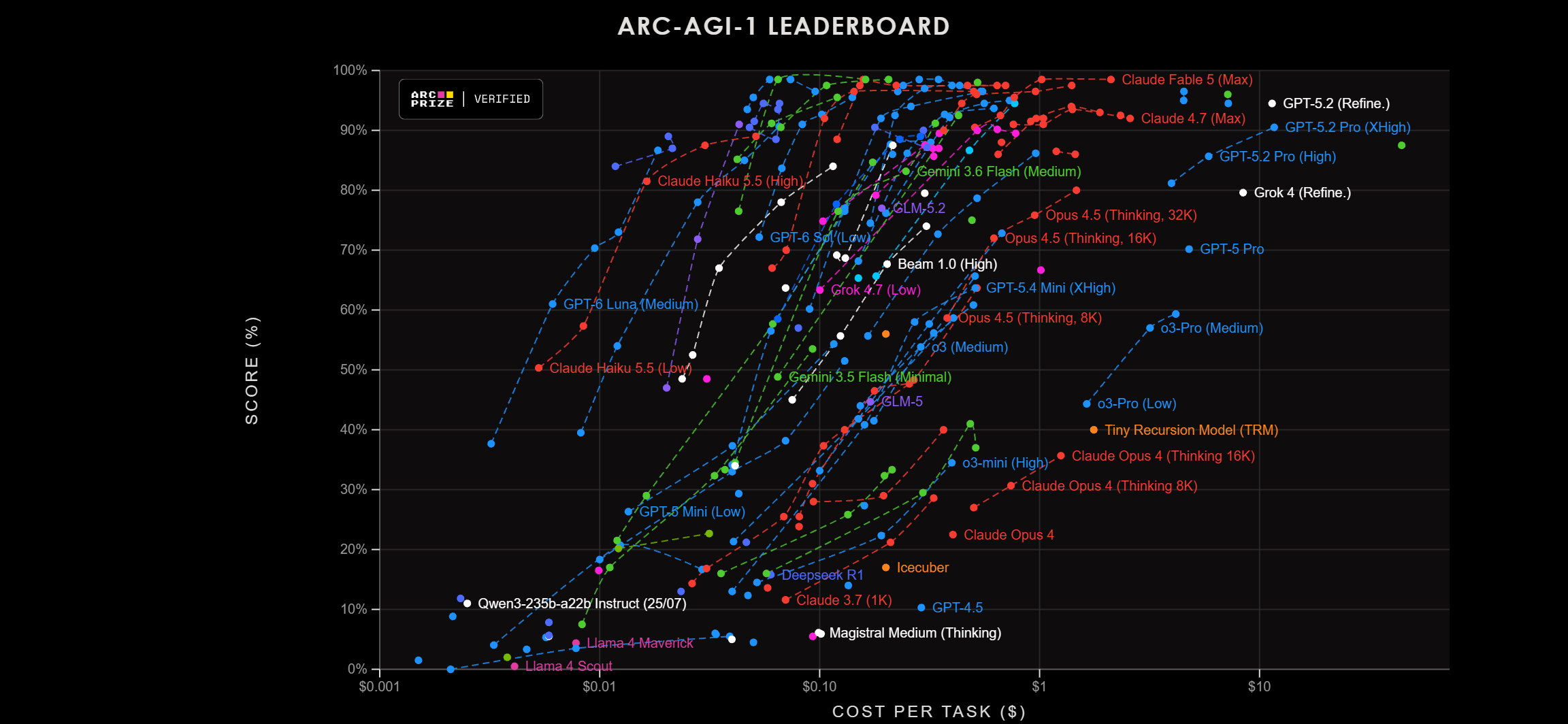
ARC-AGI-1 · abstract visual reasoning · score versus cost per task
Read the axes

Up = higher score; left = lower cost. The cost axis is logarithmic.

Follow a model’s curve

More reasoning can improve the score, with diminishing gains near the top.

Choose for your task

Use this benchmark to shortlist settings, then test your own research tasks.

AI · QUALITY, REASONING & COSTA11c

Subscription value: score is only half the picture

A second cost model · the supplied mypriors.com chart compares index score and subscription cost per task
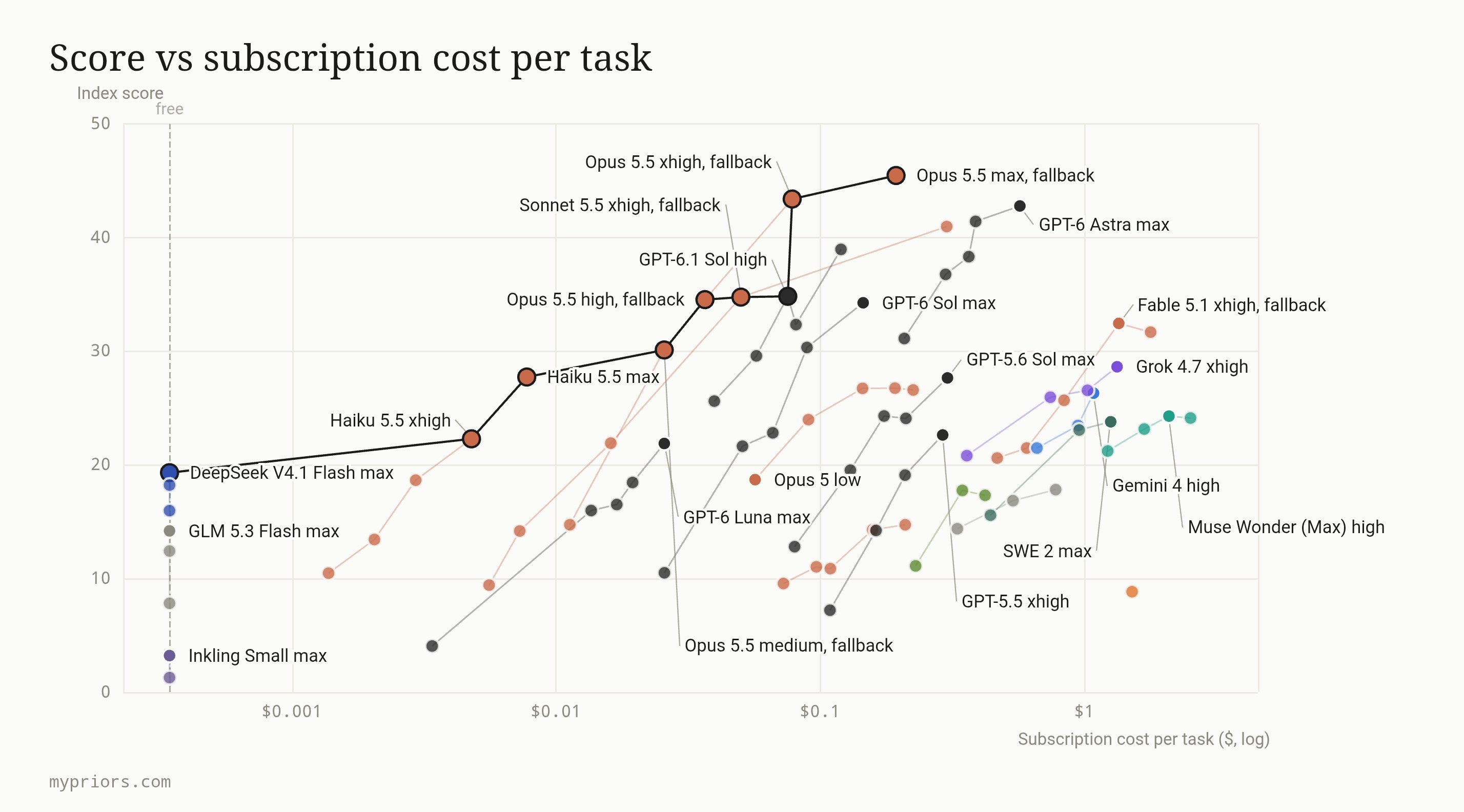
A second cost model · the supplied mypriors.com chart compares index score and subscription cost per task
Look toward the upper left

Higher score at lower estimated cost is attractive within this comparison.

Compare effort settings

Sol high, Astra max and Claude variants occupy different score–cost positions.

Keep the cost models separate

Subscription cost per task is not API token pricing or a guaranteed marginal fee.

OPTIONAL · AX4 · SUPPORTING DETAILSkip extras →

Professional agent tasks: score versus cost

User-supplied chart · OpenAI vendor-reported benchmark · compare within this test.
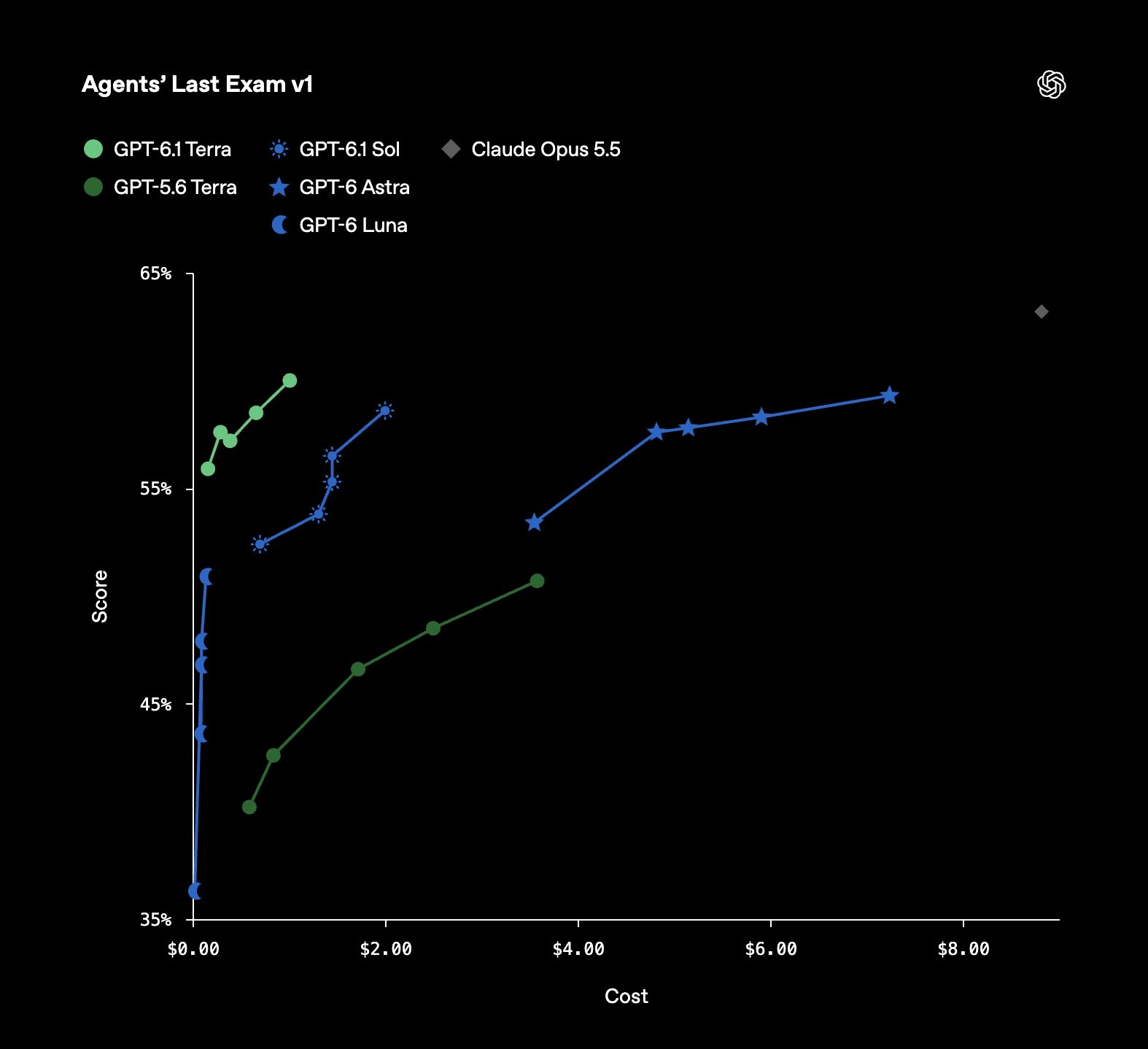
Professional agent tasks: score versus cost

Read the model, reasoning setting, task suite and cost definition together. This is not an independent scientific-research ranking.

OPTIONAL · AX5 · SUPPORTING DETAILSkip extras →

Terminal work: a different cost–quality curve

User-supplied chart · OpenAI vendor-reported benchmark · compare within this test.
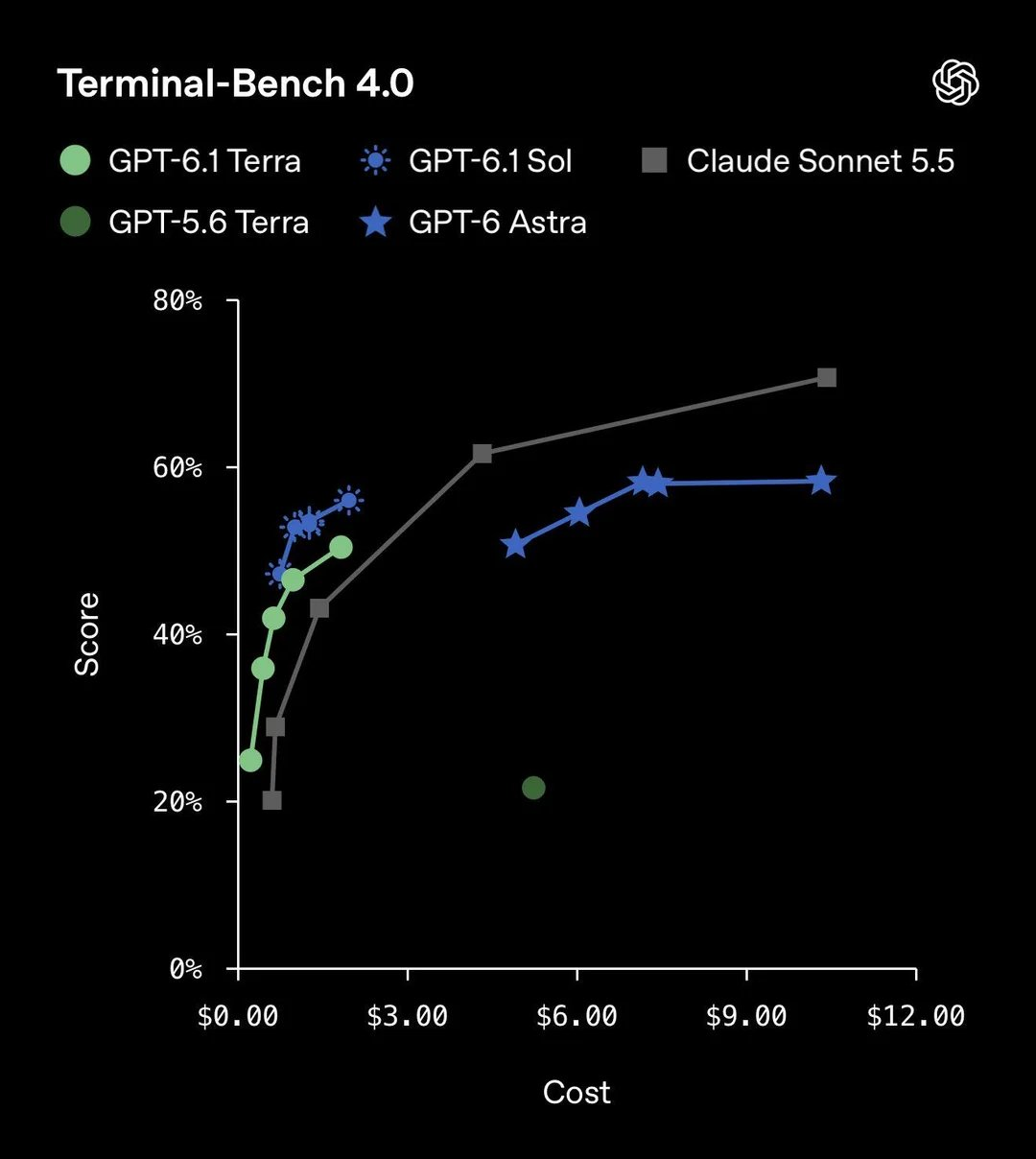
Terminal work: a different cost–quality curve

Read the model, reasoning setting, task suite and cost definition together. This is not an independent scientific-research ranking.

OPTIONAL · AX6 · SUPPORTING DETAILSkip extras →

An independent coding-agent comparison

Vals AI · Terminal-Bench 4.0 · 26 October 2026 · Mini-SWE-agent

ModelScoreReported cost / test
Claude Opus 5.565.15%$13.20
Claude Sonnet 5.564.14%$16.51
Claude Fable 5.158.08%$17.18
Gemini 4 Argon57.58%$17.64
Claude Haiku 5.536.36%$3.12

Same evaluator and harness, selected rows. Different samples and settings from the OpenAI chart. Measure your own accepted outputs.

AI · PRACTICAL RESEARCH WORKFLOWA12

Six habits that save tokens without losing rigor

Start economical; spend stronger reasoning where a failed answer is costly.

01 · Scope the context

Attach the relevant sections; search before reading entire folders.

02 · Bound the output

Ask for a patch, table or decision — not repeated full reports.

03 · Keep a handoff

Summarise accepted facts and open issues before starting a new task.

04 · Route by difficulty

Strong model for the plan; smaller model for explicit repetitive steps.

05 · Reuse evidence

Do not repeat unchanged searches or tests. Recheck after relevant changes.

06 · Measure the loop

Include retries, tool calls, review and corrections in the total cost.

FULLMAG · THE PROJECTF0

FullMag

A research platform for finite-difference and finite-element micromagnetics.

One study model.
Multiple numerical engines.

From magnetic textures and dynamics to eigenmodes and dispersion.
Mateusz Zelent · Philipp Pirro

RPTU Kaiserslautern-Landau, Germany
Department of Physics & OPTIMAS

Mateusz Gołebiewski · Uladzislau Makartsou

Adam Mickiewicz University, Poznań, Poland
Faculty of Physics and Astronomy

European Union emblemFunded by
the European Union

Mateusz Zelent acknowledges funding from the European Union's Horizon Europe programme under HORIZON-MSCA-2024-PF-01, Marie Skłodowska-Curie Grant Agreement No. 101208951 (CNMA).

Project coordination: Mateusz Zelent · RPTU Kaiserslautern-Landau
FULLMAG · THE PROJECTF0b

Why build FullMag?

Start with the research question — then choose the geometry, physics and numerical method.

01

Explore new physics

Add interactions and study magnetic textures, coupled structures and spin-wave modes.

02

Choose the right method

Use regular grids for films and multilayers, or conforming meshes for curved and complex geometries.

03

Keep the experiment connected

Carry one study from model setup through execution to field maps, spectra and reproducible results.

Can we turn a new micromagnetic idea into an inspectable numerical experiment — within one workflow?
The goal: a platform we can extend, inspect and compare with established solvers.
FULLMAG · THE PROJECTF0c

Started in April — developed with AI

Mateusz Zelent began FullMag in April, using AI assistance from the start.

APRIL

An idea becomes a project

Start building a micromagnetics platform around real research needs.

ITERATION

AI-assisted development

Connect scientific reasoning, implementation, debugging and documentation.

TODAY

A shared research framework

FDM + FEM, Python + Control Room, dynamics + spectral analysis.

AI tools used in the development workflow
OpenAI logoOpenAI

ChatGPT · Codex

Anthropic logoAnthropic

AI model provider

Claude logoClaude

Chat · coding assistance

Gemini logoGemini

Google AI

AI assists the work; the team owns the physics, implementation choices and validation.
FULLMAG · METHODS & IMPLEMENTATIONF1

Two discretizations, two different strengths

FDM = finite differences · FEM = finite elements. Both approximate the same continuum magnet.

QuestionFDM · regular cellsFEM · unstructured mesh
How is the sample represented?Magnetization on cuboid cells; surfaces cut by an active maskMagnetization expanded in nodal basis functions on mesh elements
How are derivatives computed?Neighbour stencils and face differencesIntegrals of basis functions and their gradients: the weak form
How is demagnetization computed?Nonlocal tensor convolution, accelerated by FFTScalar-potential PDE; finite airbox or FEM–BEM open-boundary treatment
Where is it attractive?Extended films, regular waveguides and repeated GPU workloadsCurved boundaries, local refinement and complex 3D geometry
What must converge?Cell size, boundary representation and time stepMesh size/order, exterior treatment and linear-solver tolerance
Choose the discretization from the geometry and required observable; compare accuracy before speed.
FULLMAG · METHODS & IMPLEMENTATIONF2

Why Fullmag alongside MuMax3 and COMSOL?

A research platform joining micromagnetics, solver development and inspectable workflows.

FullmagMuMax3COMSOL
Core approachOne model; FDM and FEM execution pathsSpecialized GPU finite-difference micromagneticsGeneral finite-element multiphysics; micromagnetics requires a suitable formulation/module
Research advantageOwn operators, new interactions, mesh/grid choice and analysis productsEstablished reference for films, dynamics and micromagnetic benchmarksGeometry, coupled PDEs and multiphysics modelling tools
WorkflowPython + Control Room → shared model → plan → saved resultsScripted simulation and output analysisModel/study setup with configurable solvers
Trade-offWe maintain physics, cross-language interfaces and qualificationGrid representation must resolve curved boundariesLicensing, model setup and solver choices; no universal performance comparison
Our motivation: change the physics and numerical method without rebuilding the entire research workflow.
FULLMAG · METHODS & IMPLEMENTATIONF3

FullMag architecture: one study, two numerical engines

Who describes the experiment, who computes the physics, and who turns results into insight?

FullMag architecture: shared study, FDM and FEM, solver families and resultsPython and Control Room feed a shared Rust model and planner. FDM uses cell stencils and FFT; FEM uses weak forms and sparse linear algebra. Both expose dynamics and relaxation. FEM has a separate eigensolve and driven-response family. Results return to analysis and visualization.Python study APIGeometry · materials · interactions · stagesControl RoomReact / Next · model setup and inspectionOne scientific experimentShared physics · explicit boundary conditionsRust: ProblemIR → capability checks → ExecutionPlan → runnerSelect FEM/FDM · CPU/GPU · precision · solver · record resolved settingsFDM · regular cellsNeighbour stencils + FFT demagnetizationFEM · unstructured elementsWeak forms + sparse linear systemsCPU: Rust / RustFFT · GPU: CUDA / cuFFTCompute effective fields; integrate or relax m.MFEM: discretization · HYPRE: linear solvesPoisson airbox / CPU FEM–BEM demag; bounded CUDALLG dynamicsTime integrationRelaxationEquilibria · loopsFFT spectraFrom trajectoriesLLG dynamicsTime integrationRelaxationEquilibria · loopsEigen / responseLinearized LLGFDM spectra are post-processing of time-domain data.No native FDM eigensolver in the presented contract.Spectral algebra: PETSc / SLEPc · bounded GPU routeslibCEED: configured support; not every operator uses it.Artifacts + metadata → API → fields / modes / dispersion / plots in Control Room
FDM/FEM select the discretization; LLG, relaxation and eigensolve select the mathematical task.
FULLMAG · METHODS & IMPLEMENTATIONF4

What runs in Python, Rust, C++ and CUDA?

A shared scientific description feeds separate numerical implementations.

LayerTechnologyResponsibility in Fullmag
Author the experimentPython DSL · NumPy · optional GmshGeometry, materials, interactions, staged studies and mesh preparation
Validate and planRust · typed ProblemIR and ExecutionPlanResolve FEM/FDM, CPU/GPU, precision and supported combinations
Execute and recordRust runner · C ABI into native backendsRun lifecycle, output streams, field data and provenance; Rust also owns the FDM CPU reference engine
Compute fields and evolve mC++/MFEM and CUDAFEM operators/solves; FDM CUDA stencils, cuFFT demag and integrators; FEM device kernels where supported
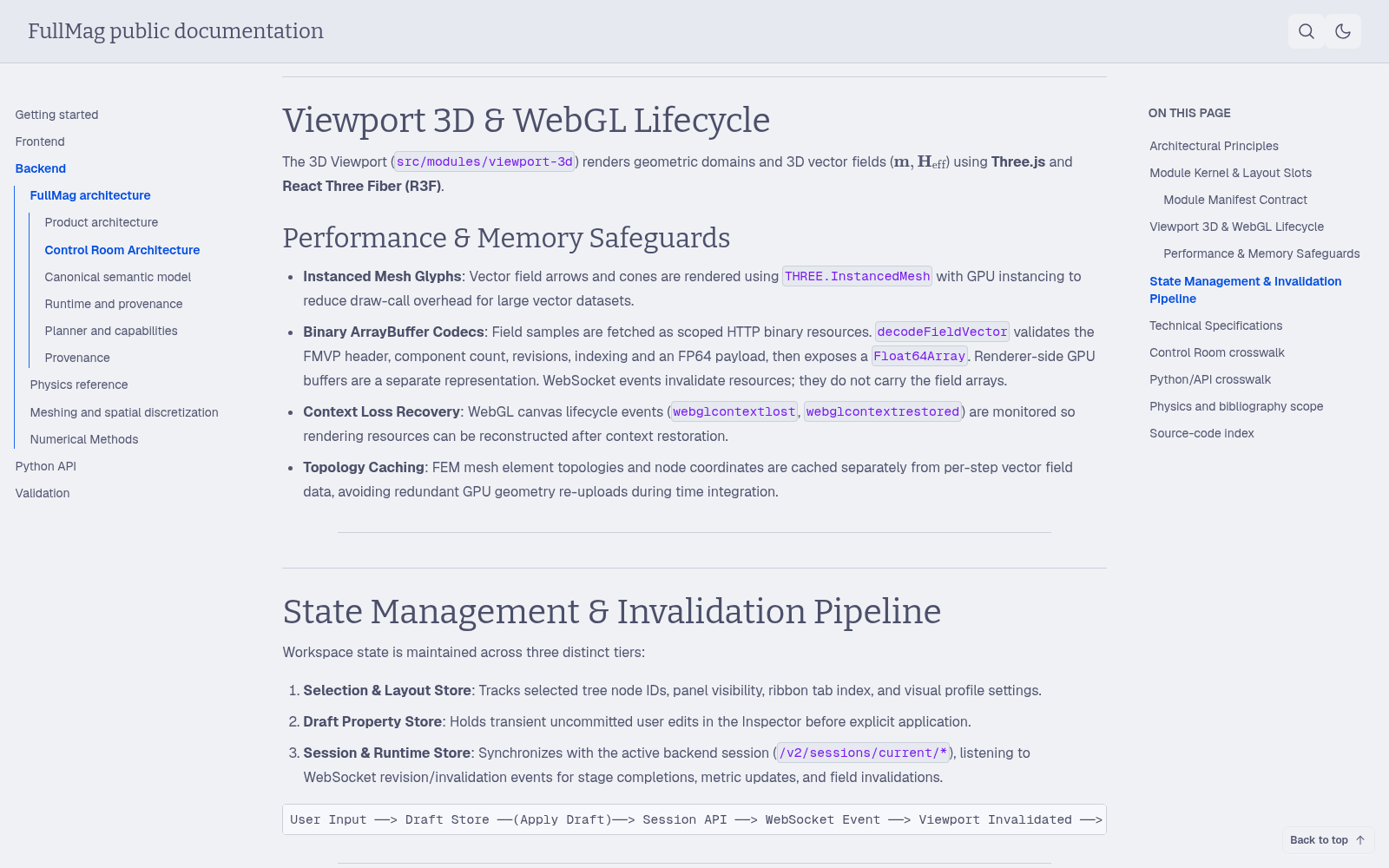
Inspect the scienceTypeScript · React/Next · Three.js · ECharts3D geometry/fields, dispersion curves, result tree and controls; Axum/Tokio provide the Rust API
Python describes the study; Rust coordinates it; numerical kernels execute the selected realization.
FULLMAG · METHODS & IMPLEMENTATIONF5

Micromagnetics: energy determines the field; LLG determines motion

The state is the unit magnetization m(r,t); material parameters set the competing length and time scales.

M=Msm,|m|=1,δE=−μ0∫ΩmMsHeff·δmdV
∂tm=−γ01+α2[m×Heff+αm×(m×Heff)]+Texplicit

What the terms do

  • Precession: rotation around the effective field.
  • Damping: energy loss towards a stationary state.
  • Direct torque: current-driven rates added with the correct Gilbert conversion.

Symbols and units

  • Mₛ, H: A/m; E: J; m, α: dimensionless.
  • γ₀ = μ₀|γ|: m/(A·s); T: s⁻¹.
  • Input B in tesla must be converted consistently; B and H are not interchangeable.
The same LLG model can be discretized with FDM or FEM; that choice changes the numerical operator.
FULLMAG · METHODS & IMPLEMENTATIONF6

Exchange illustrates what “grid” and “weak form” mean

Exchange penalizes rapid spatial changes; the discretization turns this energy into a field.

Eex=∫ΩmA|∇m|2dV,Hex=2μ0Ms∇·(A∇m)

FDM: neighbours and cell faces

Eh=∑f=i|jAfSfdf|mj−mi|2
  • Each face couples adjacent cell values.
  • Face area S and distance d encode geometry.
  • Material interfaces require a defined face coefficient A_f.

FEM: basis functions and integrals

Kij=∫A∇ϕi·∇ϕjdV,Ms(h)h=−2μ0Km
  • φᵢ: basis function; K: exchange stiffness matrix.
  • Weighted mass projection converts the energy residual into a field.
  • Consistent and lumped projection are distinct numerical choices.
A [J/m] controls stiffness; resolving the exchange length matters in both discretizations.
FULLMAG · METHODS & IMPLEMENTATIONF7

Conservative interactions: more than exchange and demag

These terms change the energy and effective field; their numerical realization depends on the solver.

InteractionPhysical effectCurrent implementation scope
ExchangePenalizes neighbouring spins pointing differentlyFDM CPU/CUDA; FEM weak operator; multilayer intralayer exchange
Uniaxial + cubic anisotropyPreferred axes / crystal directionsFDM and FEM paths; material-field and topology restrictions are lane-specific
Zeeman + demagnetizationApplied field + nonlocal self-fieldUniform Zeeman; FDM FFT / multilayer convolution; FEM Poisson / FK
Interfacial DMIChiral gradients linked to an interface normalSingle-grid FDM; FEM source paths; multilayer global +z interfacial model
Bulk DMIChiral volume gradients, m·curl(m)Single-grid FDM and FEM source paths; public multilayer rejects bulk DMI
Rotated interfacial DMIFixed chiral operator for in-plane-background texturesImplemented FDM/FEM CPU/GPU within explicit topology/boundary gates
Prescribed-strain magnetoelastic fieldStrain modifies magnetic energyInternal reference operators; not a qualified coupled mechanics solver
“Implemented” describes an operator path; the next question is which geometry, device and workload is admitted.
FULLMAG · METHODS & IMPLEMENTATIONF8

Torques, noise and current-generated fields

A direct torque is a rate in s⁻¹; an effective field is in A/m. They enter LLG differently.

MechanismWhat it representsCurrent scope / important boundary
Prescribed SOTField-like and damping-like spin-orbit torquesCPU reference and bounded CUDA/FEM paths; prescribed SOT is not a solved spin-Hall transport model
Slonczewski STTSpin-polarized current acting on a thin magnetic layerBounded fullmag.v2 local target-masked routes; interface-flux variant unsupported
Zhang–Li STTCurrent couples to magnetization gradientsSeparate formula/version contracts: MuMax3-v1 SP5 evidence does not validate Fullmag-v1 or every lane
Thermal Brown noiseStochastic field determined by temperature, damping, volume and time stepSingle-grid FDM CPU/GPU; FEM and public multilayer thermal are not executable here
Oersted field / current transportMagnetic field generated by a declared or computed currentNamed cylinder and prescribed-density paths; separate antenna field-solve workflow
RKKY / interlayer exchangeExchange coupling across layersPython/IR objects exist; current planner rejects executable coupling
Multilayer magnetostatic coupling is implemented separately from interlayer exchange and spin torques.
FULLMAG · METHODS & IMPLEMENTATIONF9

Rotated interfacial DMI is implemented

A distinct chiral energy for in-plane-background textures such as bimerons — not merely a rotated easy axis.

ErDMI=∫ΩmD[mz∂xmx−mx∂xmz+mx∂ymy−my∂ymx]dV
HrDMI=2Dμ0Ms(∂xmz−∂ymy, ∂ymx, −∂xmx)T

Meaning and authoring

  • D [J/m²] sets strength and chirality; signed D is preserved.
  • RotatedInterfacialDMI(D) selects this fixed operator.
  • anisU sets anisotropy separately; it does not rotate DMI.

Implemented scope

  • FDM: CPU and CUDA, including bounded multilayer routes.
  • FEM CPU: P1 tet4 / prism6 / pyramid5; GPU: P1 tet4.
  • Nonzero FEM periodic and eigen/frequency combinations are rejected; current Göbel bimeron qualification is NOT VERIFIED.
Nonzero rDMI at open/masked boundaries requires Exchange with positive local A; the natural boundary includes both terms.
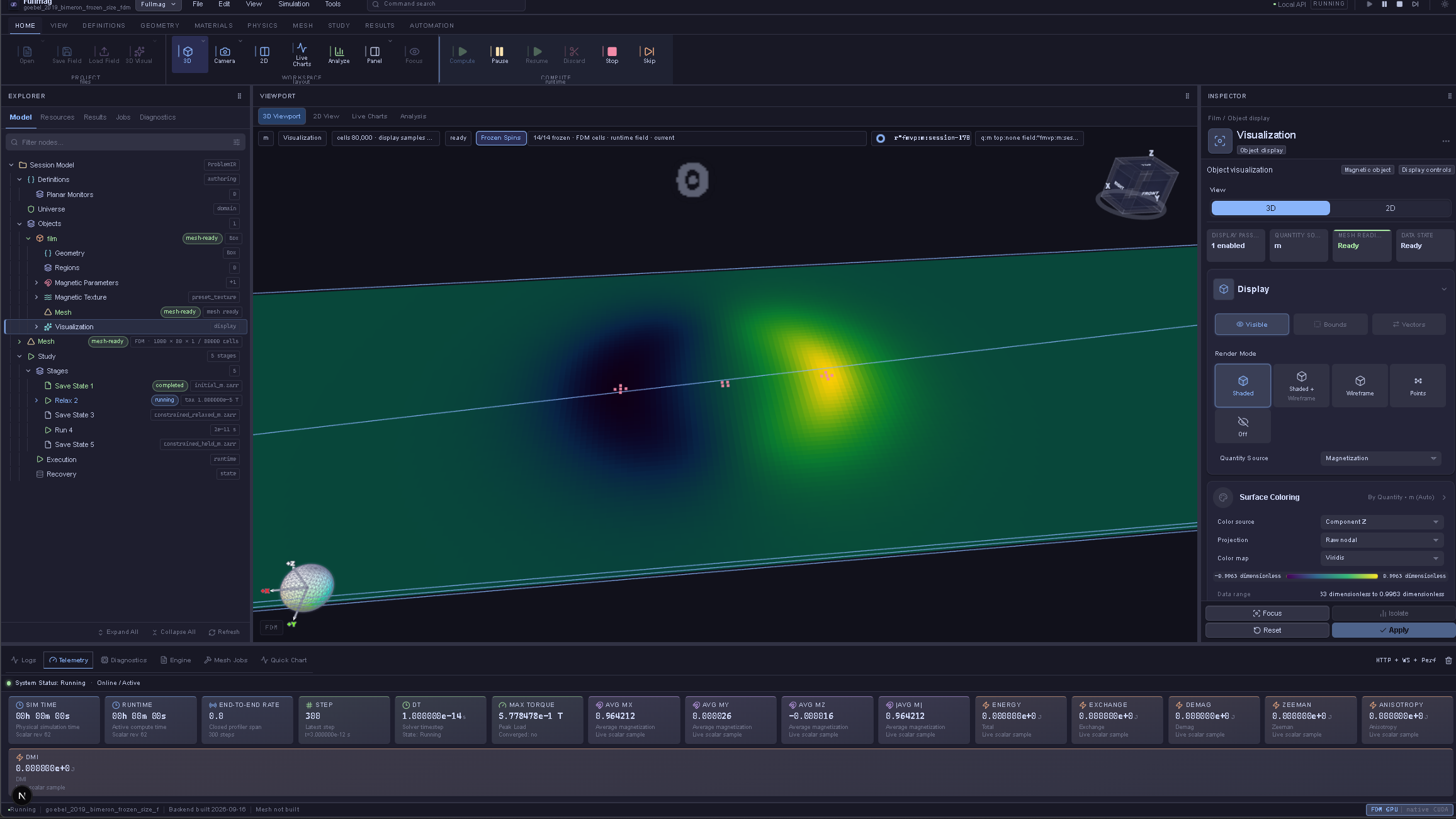
FULLMAG · ROTATED DMI RESULTSF9b

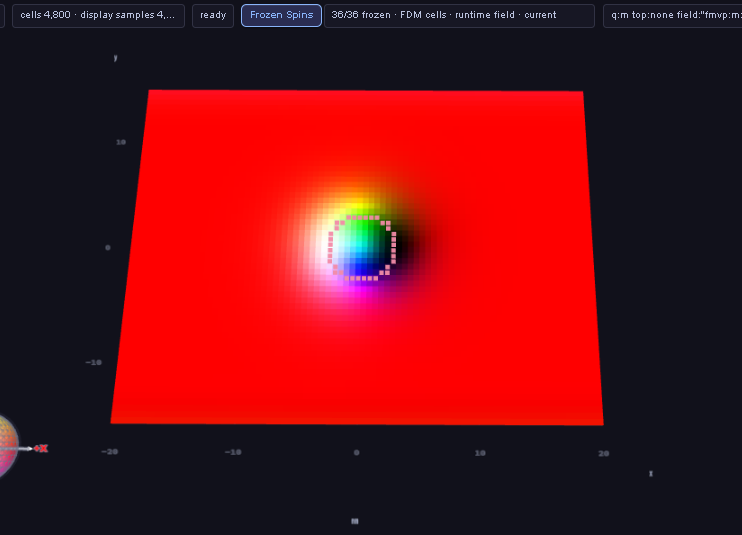
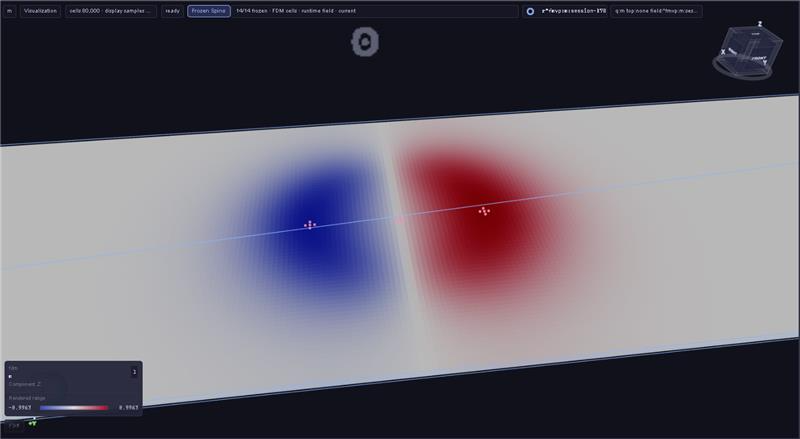
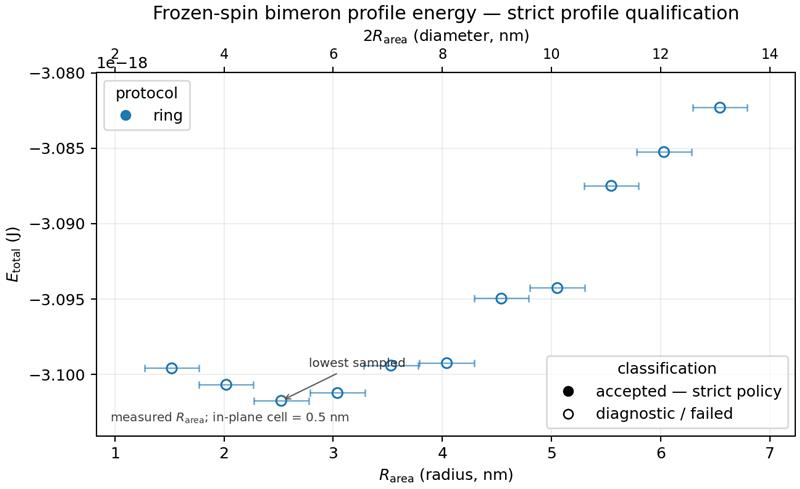
Rotated DMI: simulating bimerons

From magnetic textures to relaxation, a held state and energy diagnostics.
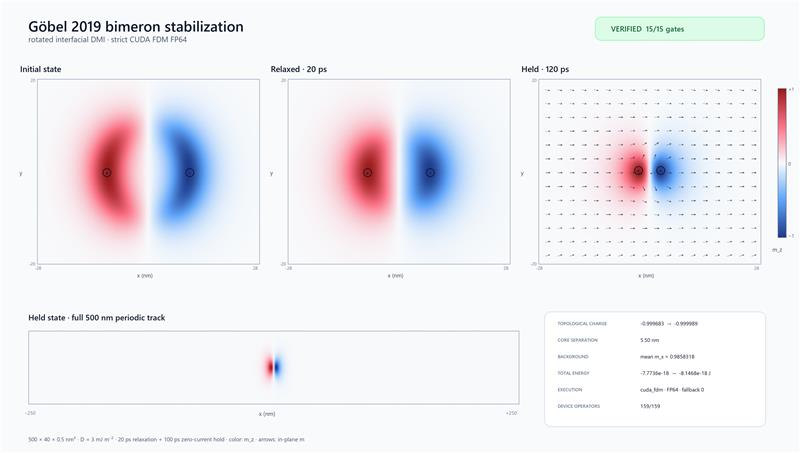
Stabilization report · initial → relaxed → held
Fullmag workspace · frozen-spin study
Magnetization texture
Opposite out-of-plane cores
Frozen-profile energy · diagnostic scan
Bimerons in Fullmag: initialize the texture → relax → hold → inspect the state and energy.
FULLMAG · METHODS & IMPLEMENTATIONF10

FDM demagnetization: a nonlocal tensor convolution

Every magnetic cell contributes to the field in every other cell; FFTs accelerate this long-range sum.

Hd,i=−∑jNijMj,H^d=−N^M^

Operator and algorithm

  • Newell tensor N: volume-averaged cuboid interaction, including the self term.
  • Pad for linear convolution → forward FFT of M → tensor–vector multiplication → inverse FFT → crop.
  • The kernel is reused while geometry and the relevant discretization stay fixed.

What runs where

  • FDM CPU: Rust reference engine and rustfft.
  • FDM GPU: CUDA buffers/kernels and cuFFT; FP32/FP64 are distinct paths.
  • Open and periodic models require different kernel/boundary conventions.
N is dimensionless in this convention; M and H are A/m. FFT speed does not remove spatial-discretization error.
FULLMAG · METHODS & IMPLEMENTATIONF11

Multilayer convolution: couple layers without filling the gaps

Each destination layer receives a field from every source layer through its own oriented pair kernel.

H^i(k)=−∑j=1LN^ij(k)M^j(k)
StageOperationWhy it is needed
1 · Native magnetizationMⱼ = Mₛ,ⱼmⱼ → common scratch representationPreserve the physical magnetic moment when layouts differ
2 · TransformPad and FFT each source layerReuse a source spectrum across its destination layers
3 · Couple ordered pairsAccumulate Nᵢⱼ Mⱼ for every j → iKernel includes source/destination thickness and physical offset
4 · Recover fieldsInverse FFT, crop and pull back to native layerReturn Hᵢ on the actual magnetic cells, not on an artificial spacer grid
There are L² ordered source–destination pairs; equal kernel descriptors can share cached kernels.
FULLMAG · METHODS & IMPLEMENTATIONF12

Multilayer: two geometrical models and a concrete work programme

The CPU descriptor path and CUDA path have different current coverage.

two_d_stackthree_d
Layer representationOne native z cell per layer, unless explicitly averagedSeveral z cells per volumetric layer
Transform2D FFT in x/y; scratch z extent = 13D pair convolution over signed x/y/z lags
Thickness and gapsIndependent thickness and centre offsets; shared in-plane cell pitches requiredLayer origins retained; translational cell pitches must match for FFT pairs
MeaningNo fictitious magnetic cells in a spacerResolves magnetization variation across layer thickness

What exists

  • CPU FP64 ordered-pair descriptors, Newell kernels and explicit transfers.
  • CUDA FP64/FP32 source; bounded 3D identity contract, with the whole step still assisted.

What is still being completed

  • Canonical CPU/CUDA pair-kernel parity and composed unequal-thickness tests.
  • CUDA XY offsets / heterogeneous thickness / transfers; fresh device evidence.
  • Current qualification matrix does not qualify the full CUDA multilayer route.
This is active numerical development, with working components and explicit remaining end-to-end gaps.
FULLMAG · METHODS & IMPLEMENTATIONF13

FEM demagnetization I: Poisson on magnet + air

Magnetization creates a potential; the surrounding air is part of the computational mesh.

Hd=−∇u,∇·(Hd+M)=0,Δu=∇·M
∫Ωm∪Ωa∇u·∇vdV=∫ΩmM·∇vdV

Numerical sequence

  • Assemble the source from M = Mₛm in magnetic elements only.
  • Solve the scalar potential system on the shared magnetic + air mesh.
  • Recover Hd = −∇u and magnetic-domain energy.

Outer boundary is an approximation

  • Dirichlet: u = 0 at the artificial boundary.
  • Robin: ∂ₙu + βu = 0, adding a boundary matrix; β has units m⁻¹.
  • Vary airbox size and mesh independently to test truncation error.
u [A], M and H [A/m]; the finite airbox approximates an unbounded exterior.
FULLMAG · METHODS & IMPLEMENTATIONF14

FEM demagnetization II: Fredkin–Koehler

FK combines volume finite elements with a boundary-element description of the exterior.

u=u1+u2,Hd=−∇(u1+u2)
StepMathematical taskFullmag realization
1 · Volume sourceΔu₁ = ∇·M; ∂ₙu₁ = M·nNeumann FEM solve; one gauge constraint per connected component removes the constant null mode
2 · Exterior contributionu₂|Γ = B(u₁|Γ)Boundary trace → hierarchical BEM operator; near interactions evaluated directly, far interactions compressed
3 · Harmonic correctionΔu₂ = 0 in the magnetSecond FEM solve with boundary values from B; combine and recover −∇u
4 · EnergyE_d = −(μ₀/2)∫ M·H_d dVIntegrate on the magnetic body; the exterior is accounted for by the boundary operator
No airbox mesh: FK represents the open exterior through the magnetic surface Γ.
FULLMAG · METHODS & IMPLEMENTATIONF15

Poisson airbox versus FK: method, cost and current state

Both are implemented; they make different geometric and algorithmic trade-offs.

Poisson airboxFredkin–Koehler FEM–BEM
Unknowns / exteriorPotential on magnet + meshed airBody potentials + boundary integral; no airbox
Main error controlsBody mesh, air mesh, outer radius and boundary conditionBody/surface mesh, quadrature and far-block compression
CPU pathMFEM assembly + HYPRE scalar solveTwo sparse HYPRE solves + hierarchical surface apply
GPU path in sourceCUDA/CSR RHS and recovery + device-HYPRE PoissonUploaded BEM hierarchy + CUDA apply + two device-HYPRE solves
Current FK restrictionsSeparate periodic Poisson realization exists3D body-only TET4/P1; nonperiodic; oriented, watertight boundary
Validation statusScoped evidence; do not generalize a periodic k=0 passCPU/GPU implementation present; current physics qualification remains NOT VERIFIED
Time-domain FK support does not imply FK support in eigenmode or frequency-response solvers.
FULLMAG · METHODS & IMPLEMENTATIONF16

Boundary conditions are part of the physical problem

A surface condition for magnetization is different from a boundary condition for the stray-field potential.

Boundary / fieldCondition and meaningConsequence for simulation
Free exchange surface · m∂ₙm = 0 when exchange alone supplies the surface variationNo imposed surface twist; do not reuse this blindly when DMI is active
Exchange + DMI · mNatural boundary balances exchange gradient and chiral boundary termEdge canting is part of the model, including rotated DMI
Fixed / frozen magnetizationSelected magnetization is constrained by the authored conditionChanges admissible dynamics and mode shapes; a pinned mode condition is not an airbox condition
Periodic sample · mMatch paired boundaries; waves acquire a Bloch phase in eigensolveBoundary pairing and translation must be defined consistently
Open exterior · uPoisson: finite outer condition. FK: boundary integral for the exteriorChanges demag accuracy and, therefore, equilibrium and frequencies
2A∂nm+D(nxmz−nymy, nymx, −nxmx)T=0(exchange + rDMI)
n is the outward unit normal; ∂ₙ is a normal derivative. Boundary choices must accompany every comparison.
FULLMAG · METHODS & IMPLEMENTATIONF17

Time evolution, relaxation and energy minimization

These algorithms answer different questions even when they reuse the same effective-field operators.

TaskNumerical ideaWhat to inspect
Run dynamicsIntegrate LLG with the selected stepper and time/error controlm(t), energy, torque and temporal convergence
Relax with LLGSuppress precession / follow damping towards a stationary stateStopping criterion and the final torque; elapsed relaxation time is not a physical transient
Minimize energyProjected gradient / Barzilai–Borwein choices where admittedEnergy descent, unit-length constraint and termination reason
Prepare an eigenproblemAccept a stationary state and its effective fieldA residual equilibrium torque contaminates the linearization

Implementation choices matter

Fullmag contains explicit stepping and relaxation paths in Rust/CUDA and native FEM, with different admissible integrator/precision combinations. A solver name alone does not specify the run.

Comparisons need the same history

Different random seeds, minimizers or stop rules can choose different metastable states, explaining part of the hysteresis differences shown next.

Save the integrator, time step/tolerance, initial state and actual stopping reason with the result.
FULLMAG · METHODS & IMPLEMENTATIONF18

Microwave antennas: from current to excitation field

The current distribution and conductor geometry determine the spatial Oersted field applied to the magnet.
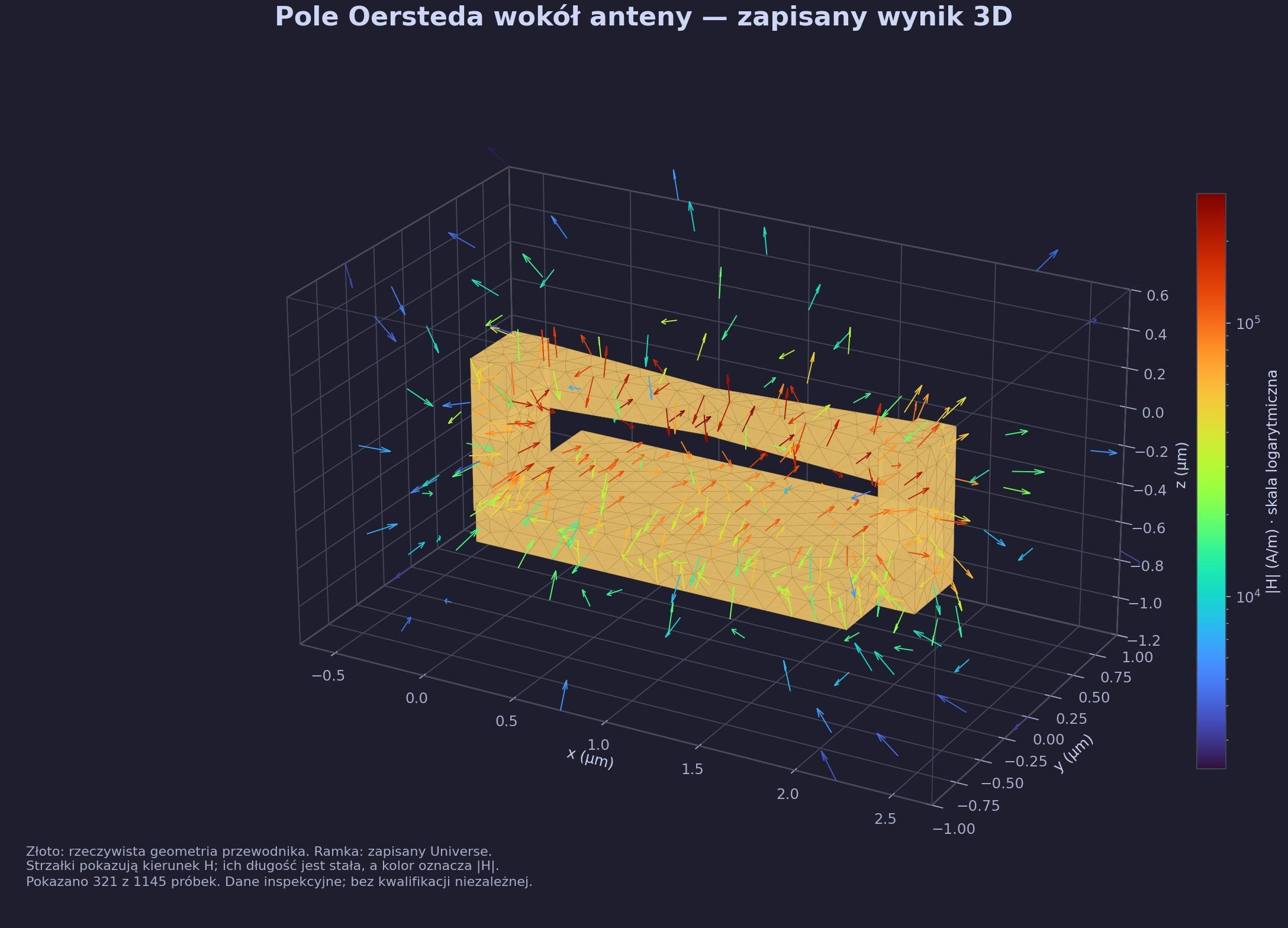
3D: conductor geometry and field-vector samples.
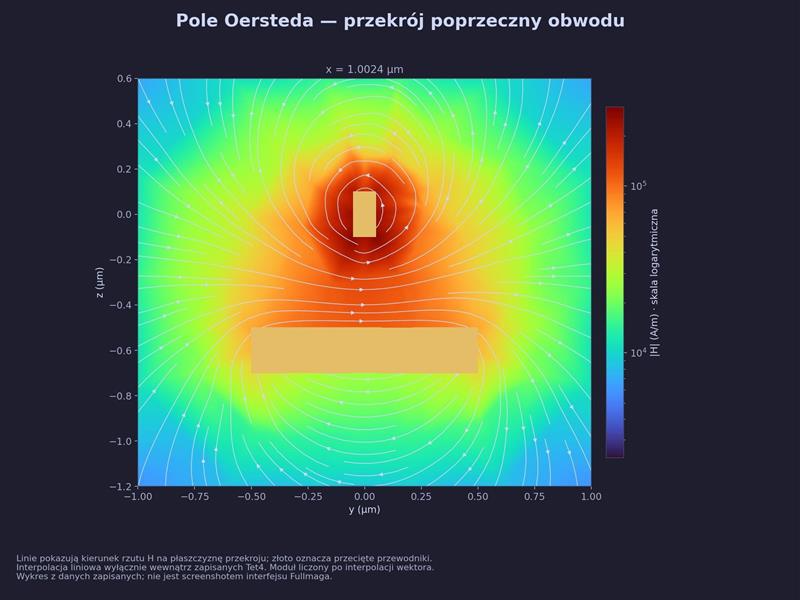
Cross-section: |H| colour map and projected field lines.
StageWhat is computedWhy it matters
Conductor / currentCharge-transport solution and conservative current representationThe return path and terminal conditions affect the generated field
Field operatorDirect tetrahedral Biot–Savart quadrature or bounded vector-potential FEM routeComputes the field in the target region; not a full-wave radiation claim
Magnetic excitationSample/project the saved field basis; apply the declared driveA spatially nonuniform drive selects which modes are excited
The two supplied figures visualize saved field data; they are not screenshots of the live Fullmag UI.
FULLMAG · METHODS & IMPLEMENTATIONF19

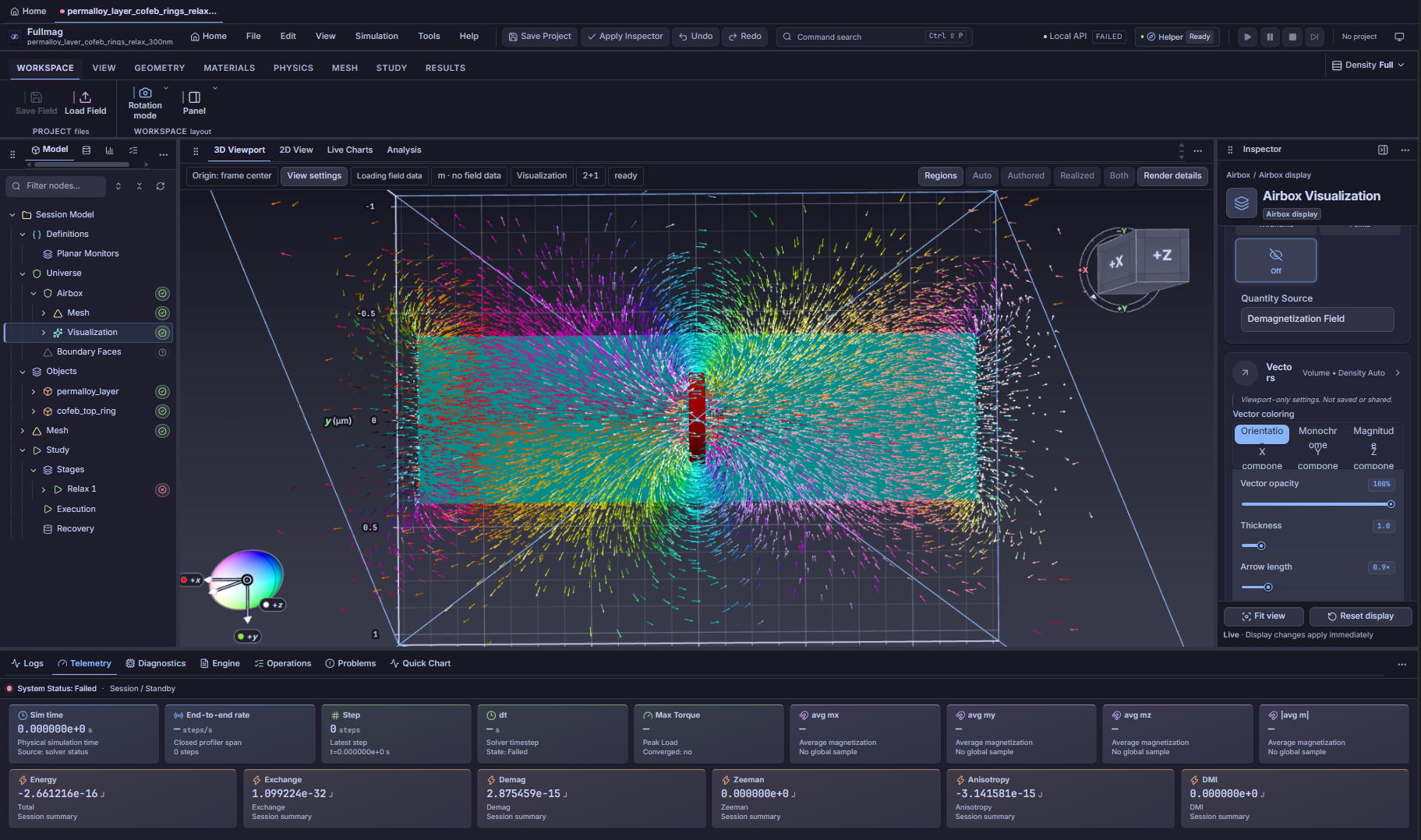
Demagnetizing field in the surrounding air

Two views of the airbox: the magnetostatic field extends beyond the magnetic material.
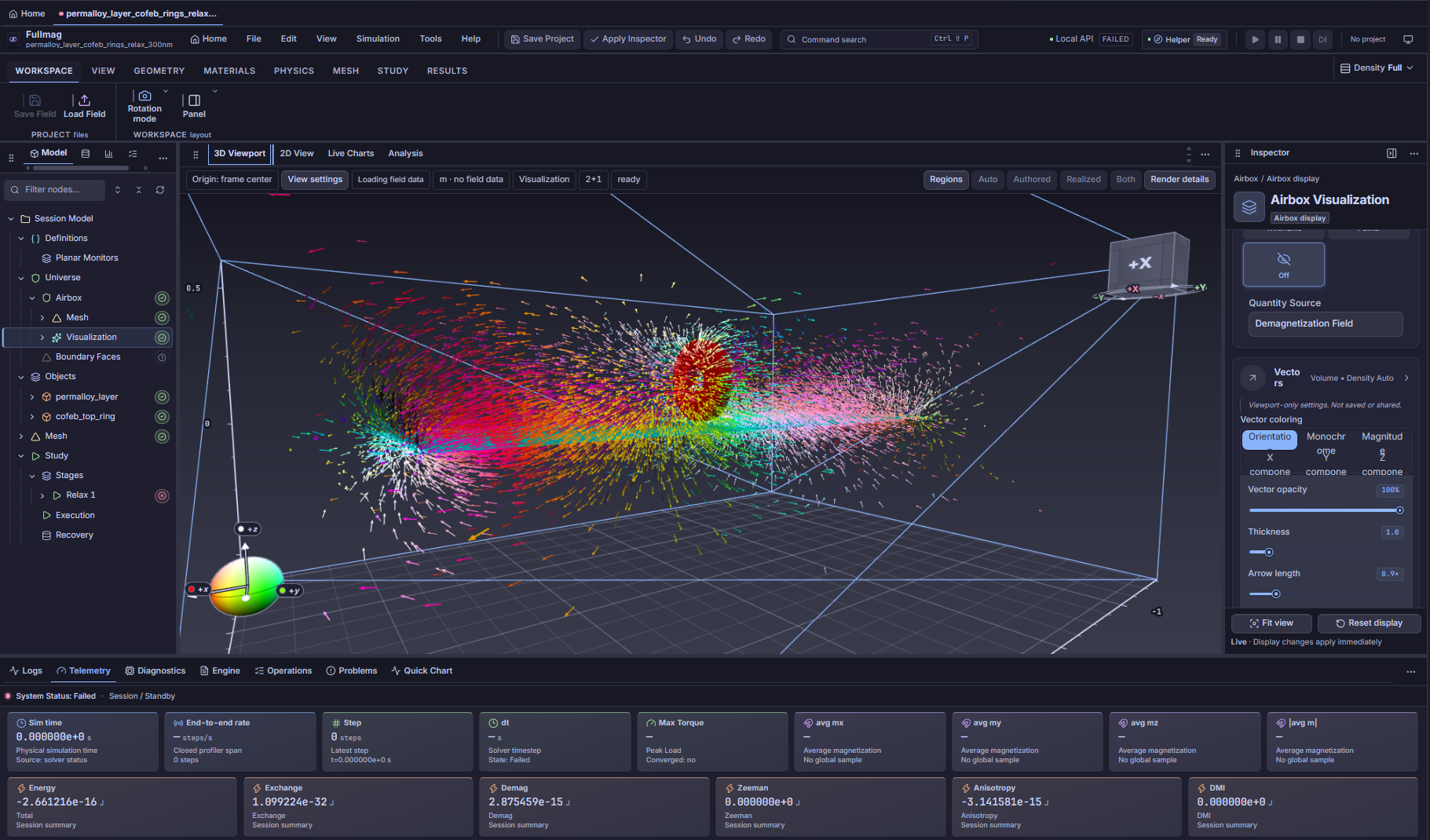
Oblique view · field vectors throughout the airbox
Rotated view · spatial structure around the magnetic bodies
Read the visualization: arrows show field direction; the selected colour mode encodes orientation. Use magnitude colouring and an A/m scale to compare field strength.
Hᵈ = −∇u: inspect the exterior field as well as the magnetization inside the sample.
FULLMAG · METHODS & IMPLEMENTATIONF20

Standard Problem 4 · Fullmag FDM vs MuMax3

Matching snapshots and overlapping magnetization traces
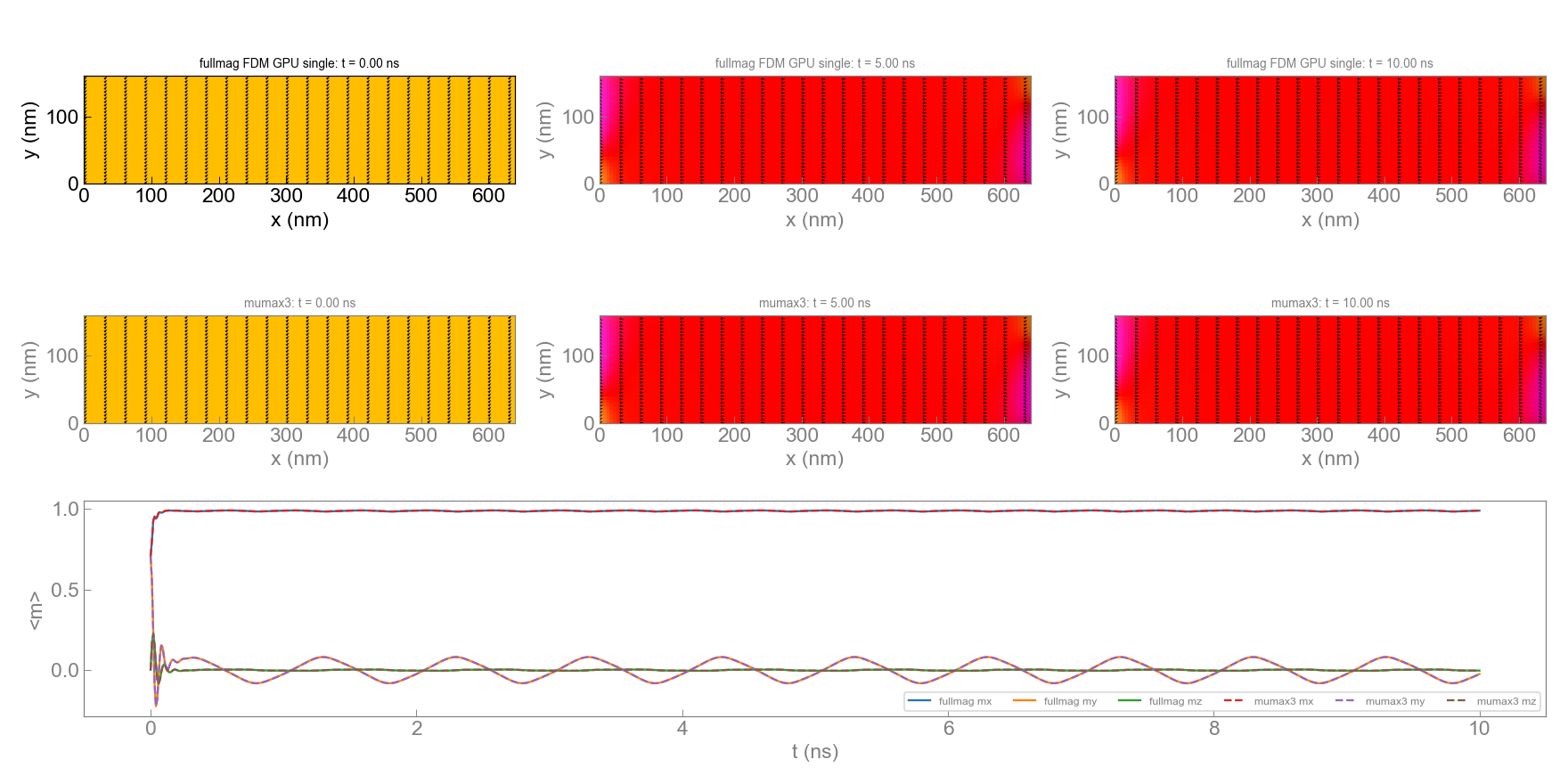
Top: Fullmag FDM GPU single precision. Bottom: MuMax3. Snapshots at 0, 5 and 10 ns.
Agreement at plotting resolution · Fullmag: solid lines; MuMax3: dashed lines.
FULLMAG · METHODS & IMPLEMENTATIONF21

Hysteresis: agreement also reveals what to investigate

A field sweep follows metastable states, so preparation and stopping rules can shift switching events.
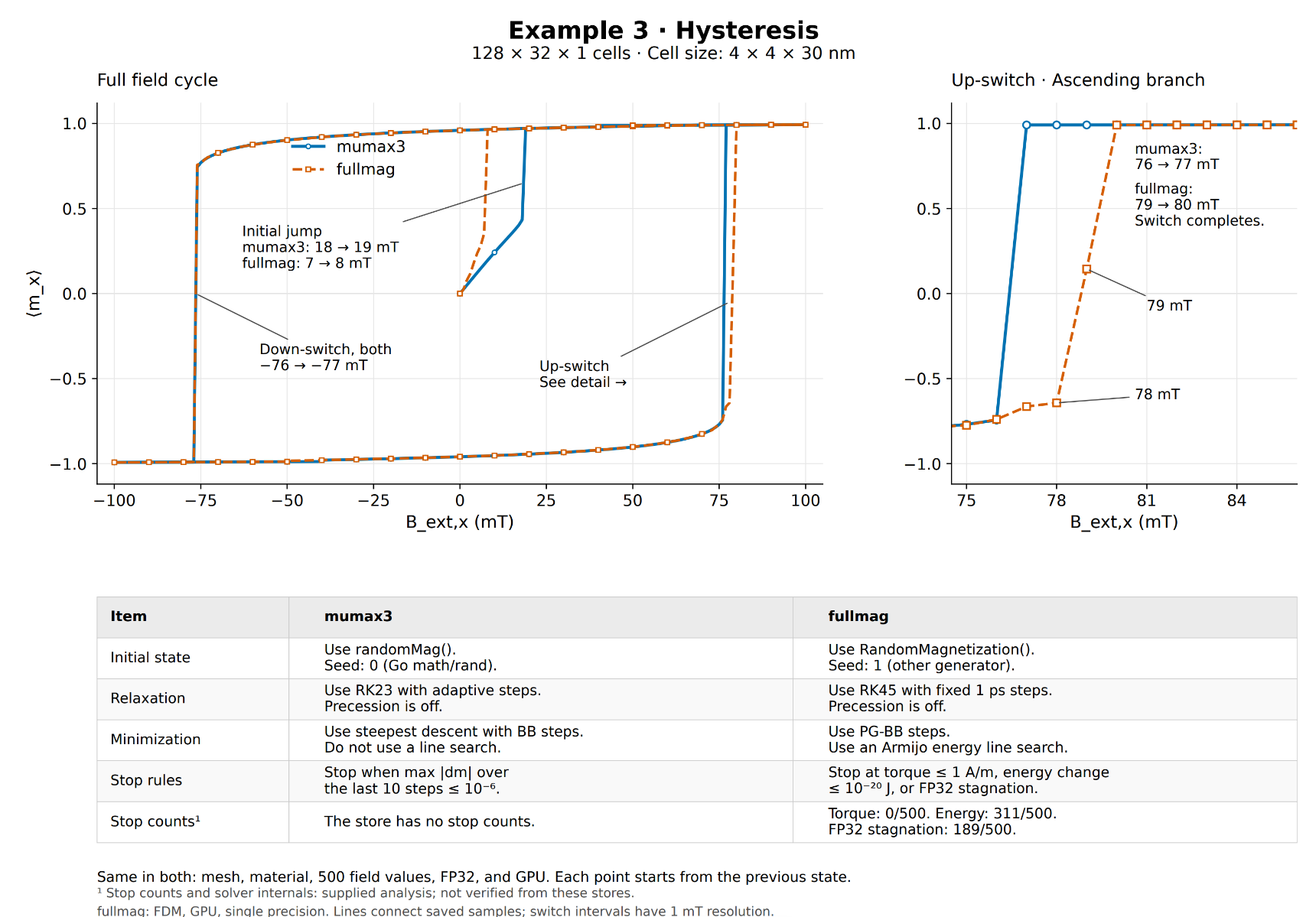
The supplied comparison uses 128 × 32 × 1 cells, with cell size 4 × 4 × 30 nm.

Read the branches

  • Large portions of the loop overlap closely.
  • Down-switch: both report −76 → −77 mT.
  • Ascending switch: MuMax3 76 → 77 mT; Fullmag 79 → 80 mT.
  • The initial jump also differs.

Interpretation

The figure reports different random initial states, relaxation/minimization algorithms and stop criteria. These differences need controlled comparison before attributing a shift to one field operator.

A useful benchmark reports differences explicitly and controls the history of the state.
FULLMAG · EIGENSOLVE · SEPARATE SOLVER FAMILYE0

Eigensolve: natural oscillations, not time stepping

A separate solver family built around a linearization of the magnetic equations.

Time-domain LLG

  • Input: initial magnetization and a time-dependent drive.
  • Output: a trajectory m(r,t), including nonlinear motion.
  • A spectrum is inferred afterwards from an FFT.

Eigenmode problem

  • Input: equilibrium m₀, material operators and boundary conditions.
  • Output: selected eigenfrequencies and complex spatial mode profiles.
  • Small-amplitude approximation; no time trajectory is integrated.
equilibrium ⟶ linearized operator ⟶ (ωn,δmn)
An animated eigenmode is reconstructed from a complex mode; it is not evidence of a time-domain simulation.
FULLMAG · EIGENSOLVE · SEPARATE SOLVER FAMILYE1

From equilibrium to a magnetic eigenproblem

A mode perturbs the equilibrium only in directions perpendicular to m₀.

m(r,t)=m0(r)+Re[δm(r)e+iωt],m0·δm=0
Lq=λBαq,λ=iω,δm=Tq

Physical content of L

  • Linearized exchange, anisotropy and applied/static-field response.
  • Dynamic demagnetization δHd[δm], when included.
  • Projection onto the local tangent plane: two unknown components per active spin.

Meaning of the symbols

  • T: local tangent basis; q: complex mode coefficients.
  • L: linearized dynamics operator; Bα: projected mass/gyrotropic operator.
  • ω: angular frequency [s⁻¹]; f = Re(ω)/(2π) [Hz].
The equilibrium must be stationary enough for “small oscillation around m₀” to be a meaningful approximation.
FULLMAG · EIGENSOLVE · SEPARATE SOLVER FAMILYE2

Boundary conditions define which modes are allowed

Free, pinned and Bloch-periodic boundaries represent different physical experiments.

Condition on δmMeaningEffect
Free: ∂ₙδm = 0Natural exchange boundary without additional surface torqueBoundary spins can precess
Pinned: δm = 0Dynamic motion suppressed on the selected boundaryChanges standing-wave profiles and eigenfrequencies
Periodic at k = 0Equal values on corresponding boundary pointsThe same oscillation repeats in each cell
Bloch/Floquetδm_dst = exp(−ik·Δr) δm_srcNeighbouring cells have a controlled phase shift; scanning k gives dispersion
qdst=e−ik·Δr(TdstTTsrc)qsrc

k [rad/m] is the wavevector; Δr [m] is the cell translation. The tangent-frame map matters when local bases differ.

A phase factor on two coefficients is sufficient only when the paired tangent bases coincide.
FULLMAG · EIGENSOLVE · SEPARATE SOLVER FAMILYE3

Dynamic demagnetization must obey the same wavevector

The static demag field sets the equilibrium; its linear response belongs inside the eigen-operator.

Δδu=∇·(Msδm) in the magnet,Δδu=0 in air,δHd=−∇δu

Full 3D Bloch cell

  • Pair both magnetic and airbox faces.
  • Apply the same complex phase to δm and δu.
  • Use opposite outward normals in flux matching.
  • The outer air boundary still determines exterior truncation.

2.5D cross-section is a different model

  • Replace the propagation derivative by −ik along an invariant axis.
  • Requires invariant geometry, material, equilibrium and boundary data.
  • Do not combine shifted derivatives with full-cell phase constraints: that counts k twice.
  • This cross-section route is a planned path, not qualified support.
A k=0 potential solve is not a substitute for dynamic demag at nonzero k.
FULLMAG · EIGENSOLVE · SEPARATE SOLVER FAMILYE4

What the eigensolver currently contains

Separate source capabilities, admitted workloads and numerical qualification.

PathAvailable in the current sourceBoundary of the claim
FEM CPUEigenmodes, k-path orchestration, dense small-problem oracles and selected PETSc/SLEPc routesGamma/free and explicit Floquet payload gates; general selected windows require Full2x2 and ignored damping
FEM CPU dynamic demag-kShared-domain Floquet-airbox assembly boundarySource-visible CPU bridge; no current-main managed qualification established
FEM GPUK0 shared-domain PETSc/SLEPc path; narrow K0/no-demag cuSolverDN Kittel routeNot a general GPU modal solver; nonzero-k GPU routes remain gated
FDM CPU / GPUTime-domain trajectories and postprocessed spectraNo native FDM eigen solver in this contract
Spectrum selectionTargeted eigenpairs near a requested frequencyNearest modes do not certify a complete frequency window
The architecture targets sparse or matrix-free selected modes; dense diagonalization remains a small-system reference.
FULLMAG · EIGENSOLVE VALIDATIONE4b

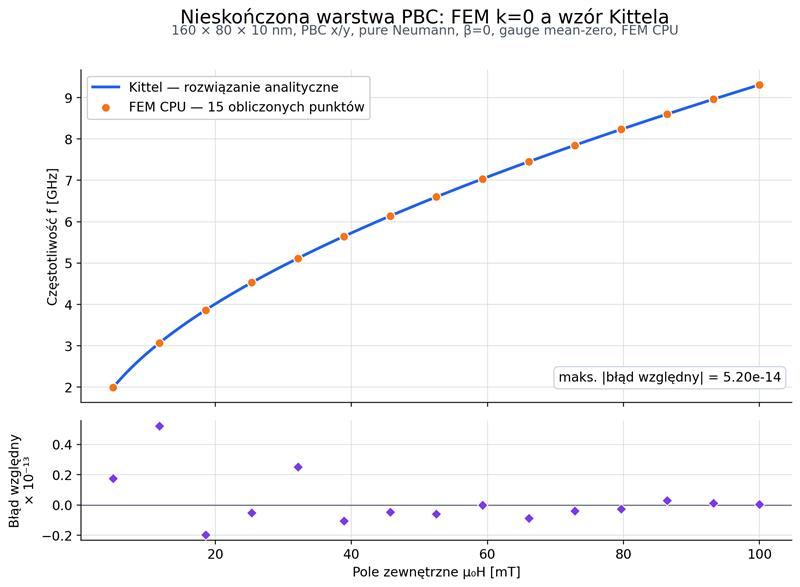
Eigensolve versus the Kittel equation

Uniform-mode analytical benchmark

FEM CPU eigenfrequencies versus the Kittel analytical curve; 15 points and relative-error panel

15 points

FEM CPU · k = 0

5.20 × 10⁻¹⁴

Maximum relative error
reported in the figure
The computed eigenfrequencies overlap the analytical curve.
FULLMAG · EIGENSOLVE · SEPARATE SOLVER FAMILYE5

Dispersion: connect each frequency to its wavevector

A k-path is a sequence of distinct eigenproblems, not a single frequency spectrum.
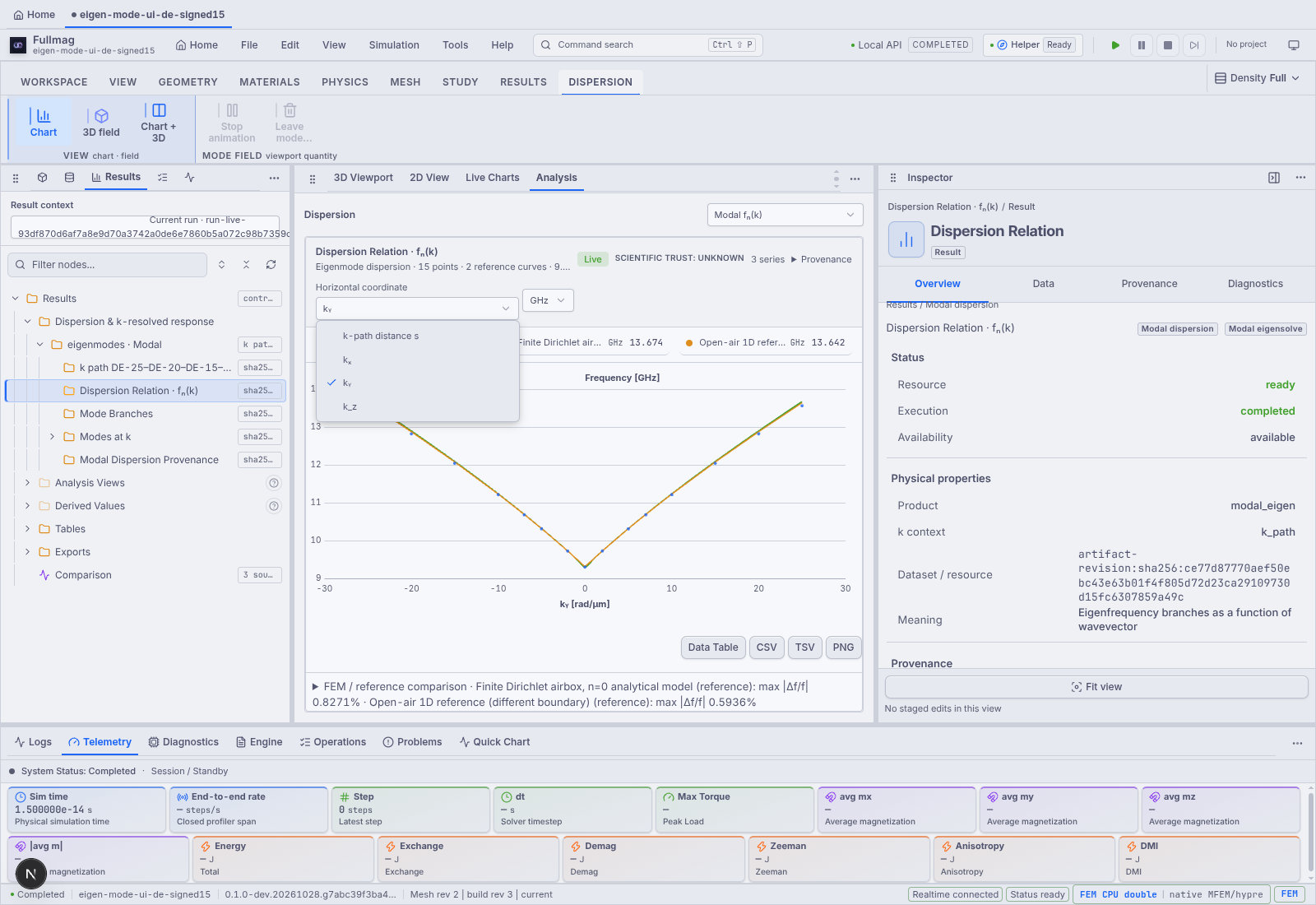
Recorded FEM dispersion UI with analytical reference curves.

Read the comparison

  • Horizontal position identifies the wavevector sample.
  • Each branch follows an eigenmode across samples.
  • Reference curves test a specified analytical model and boundary assumptions.

Ask before claiming agreement

Do the thickness, material, equilibrium, exchange and exterior conditions match? Track modes consistently and check spatial/solver convergence.

This recorded case comes from its source thread; it is not a fresh execution of today’s main checkout.
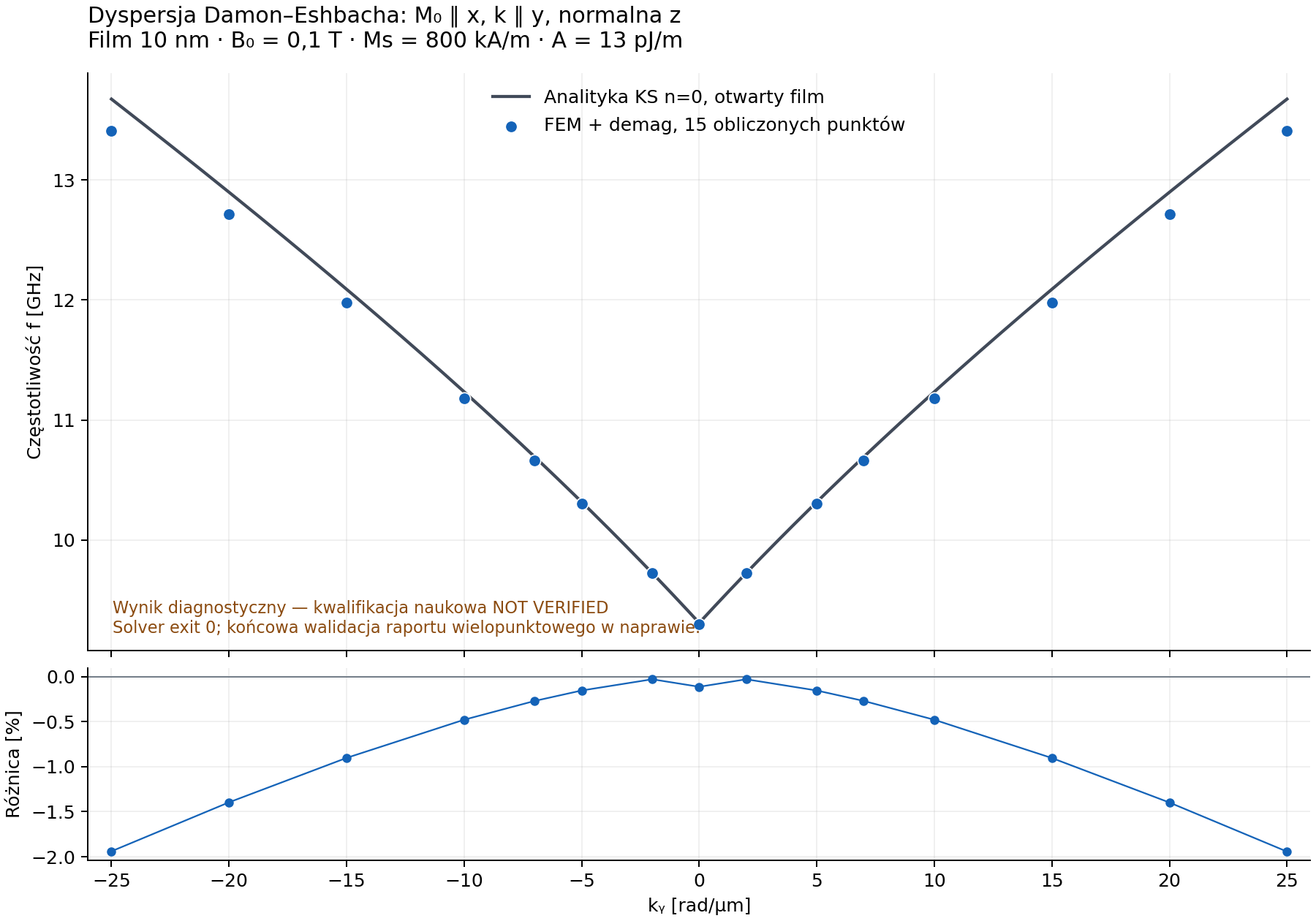
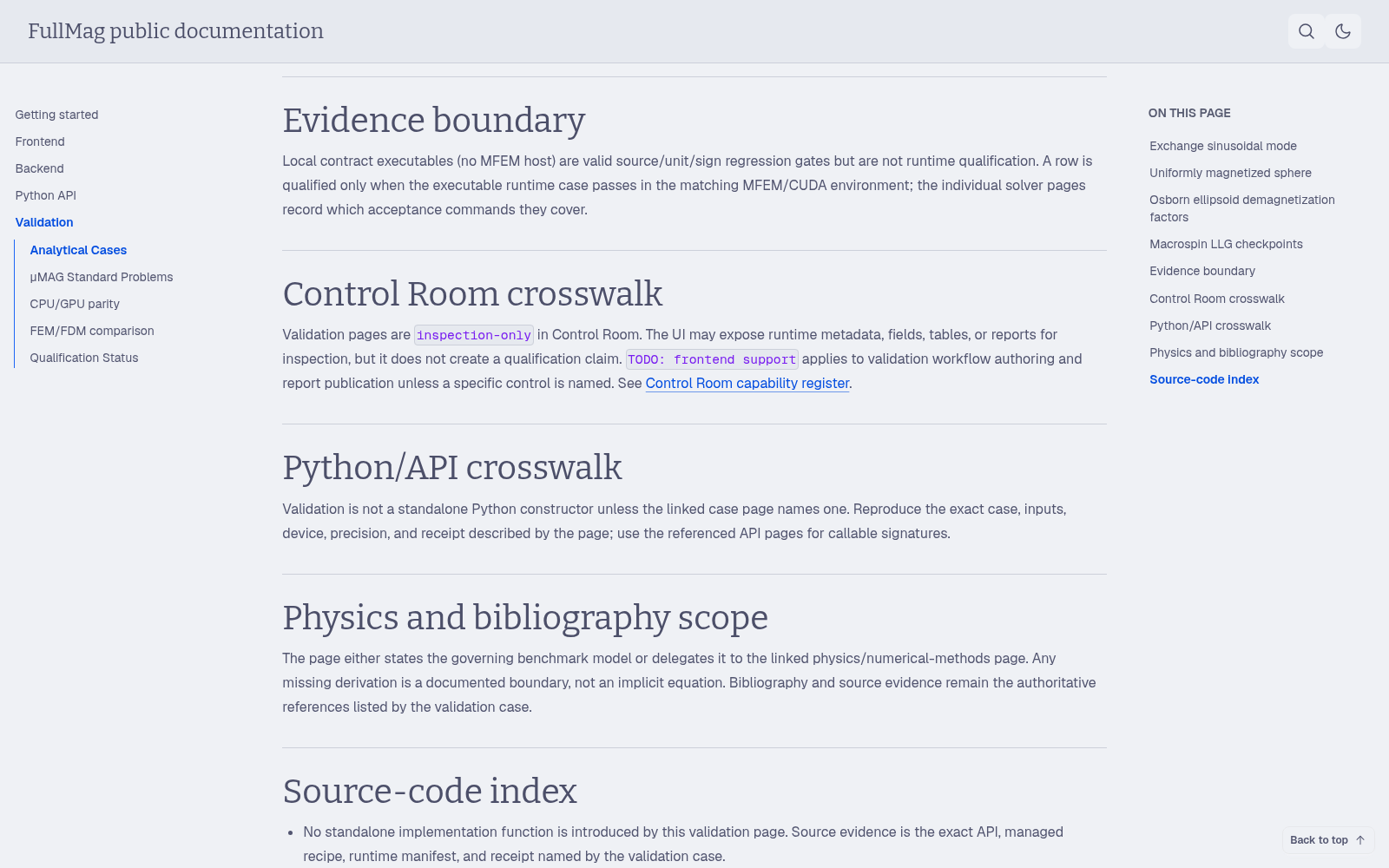
A dispersion curve is meaningful only together with the physical assumptions and mode identity.
FULLMAG · EIGENSOLVE · SEPARATE SOLVER FAMILYE6

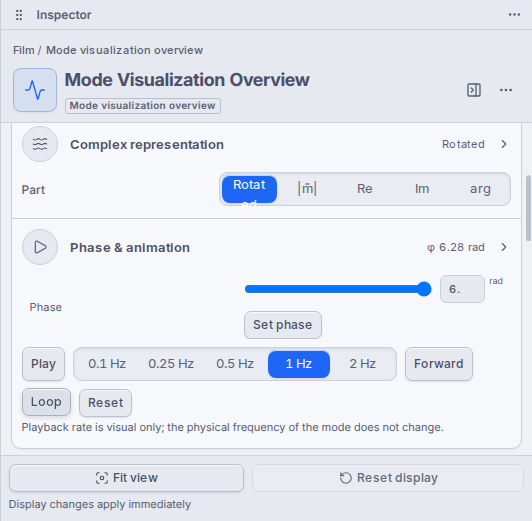
Mode shape: a complex spatial oscillation

A frequency alone does not tell us whether a mode is edge-localized, uniform or confined across the waveguide.
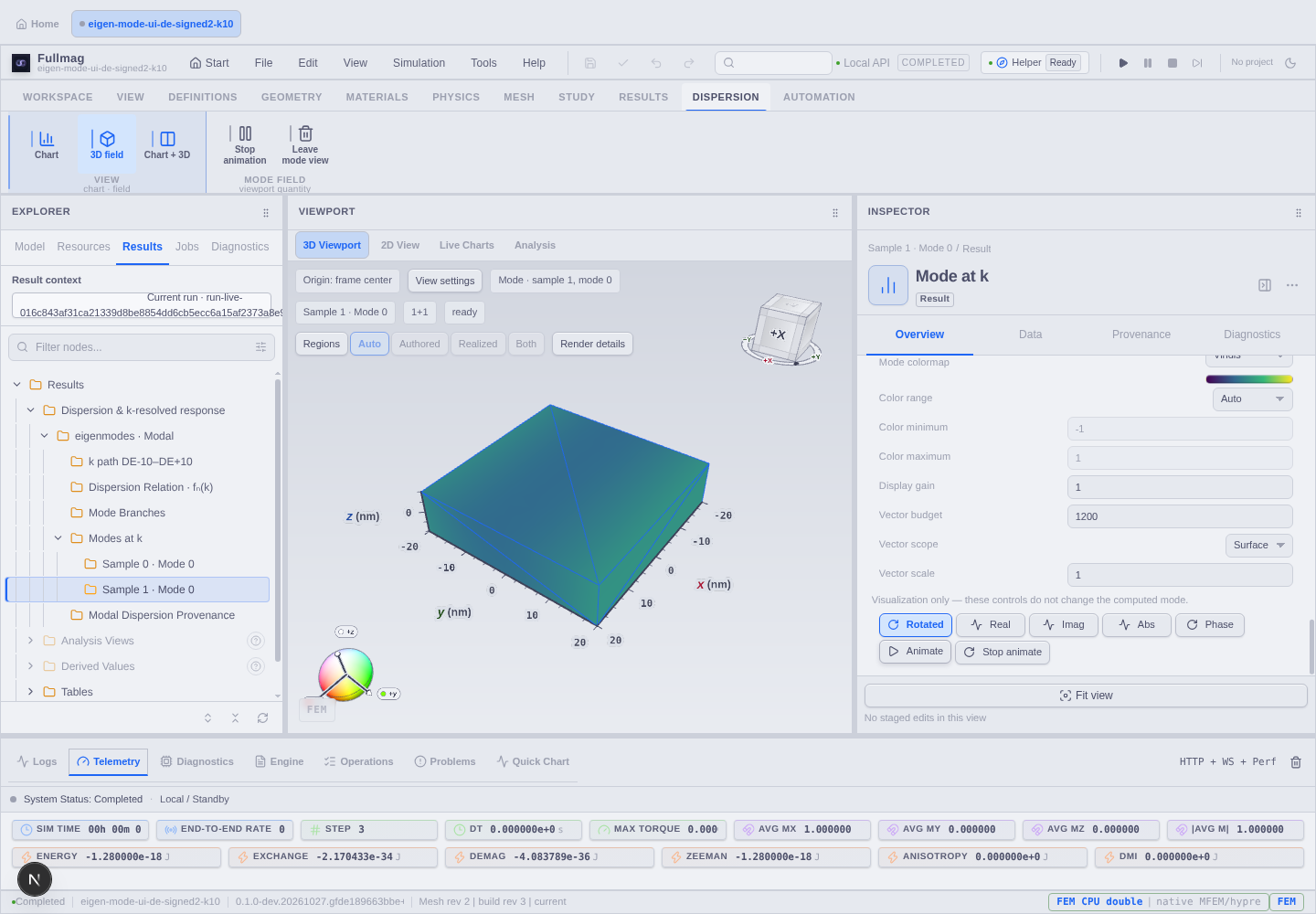
Supplied Fullmag mode view: sample selection, component/phase controls and spatial field display.

What to inspect

  • Select the wavevector and mode index.
  • Inspect real, imaginary, magnitude or phase representation.
  • Follow nodes, localization and relative phase across the sample.
  • Keep display gain distinct from physical amplitude.

Animation

Reconstruct Re[δm exp(iωt)]. The eigenvector normalization is arbitrary until an amplitude convention or driven response is specified.
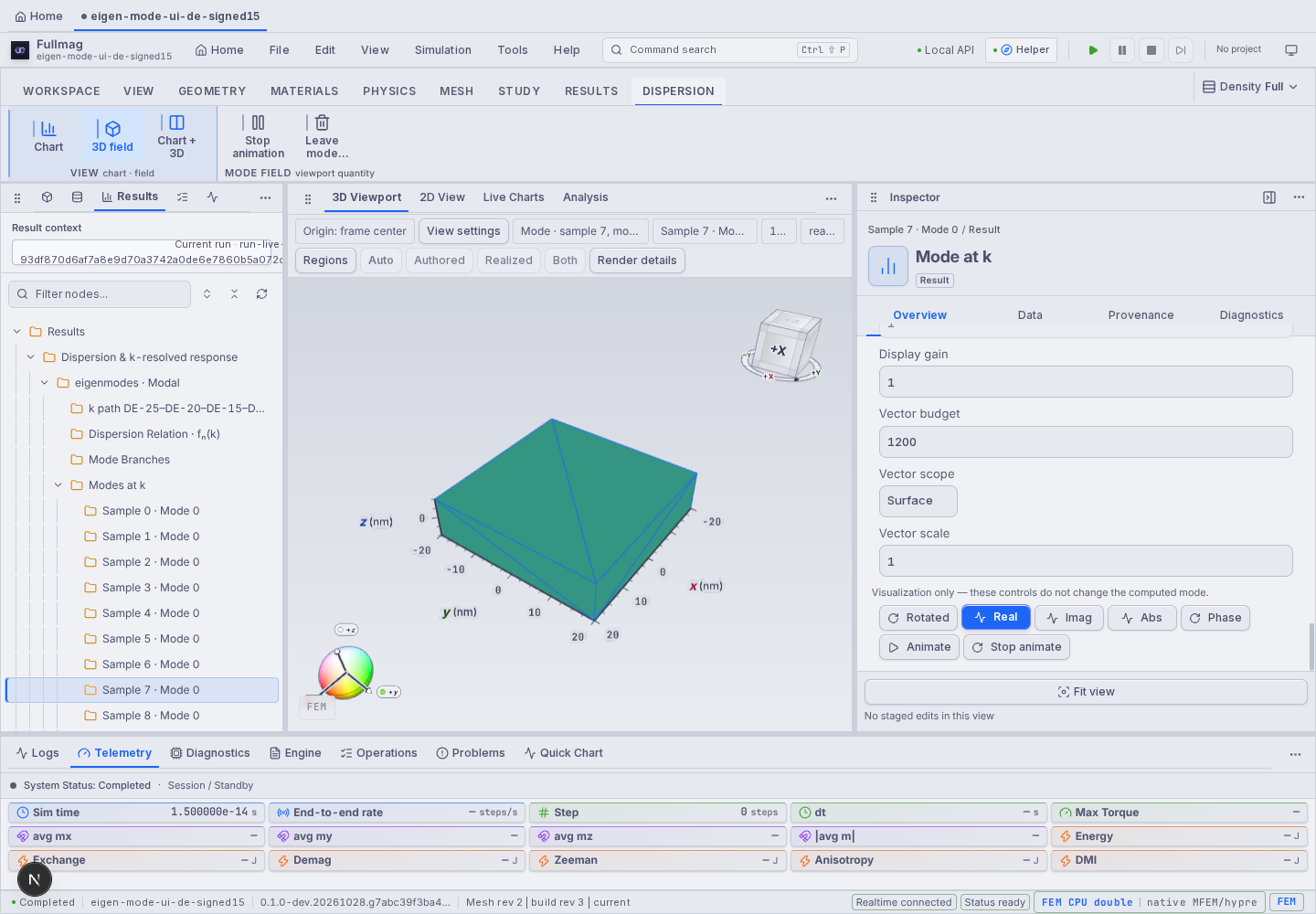
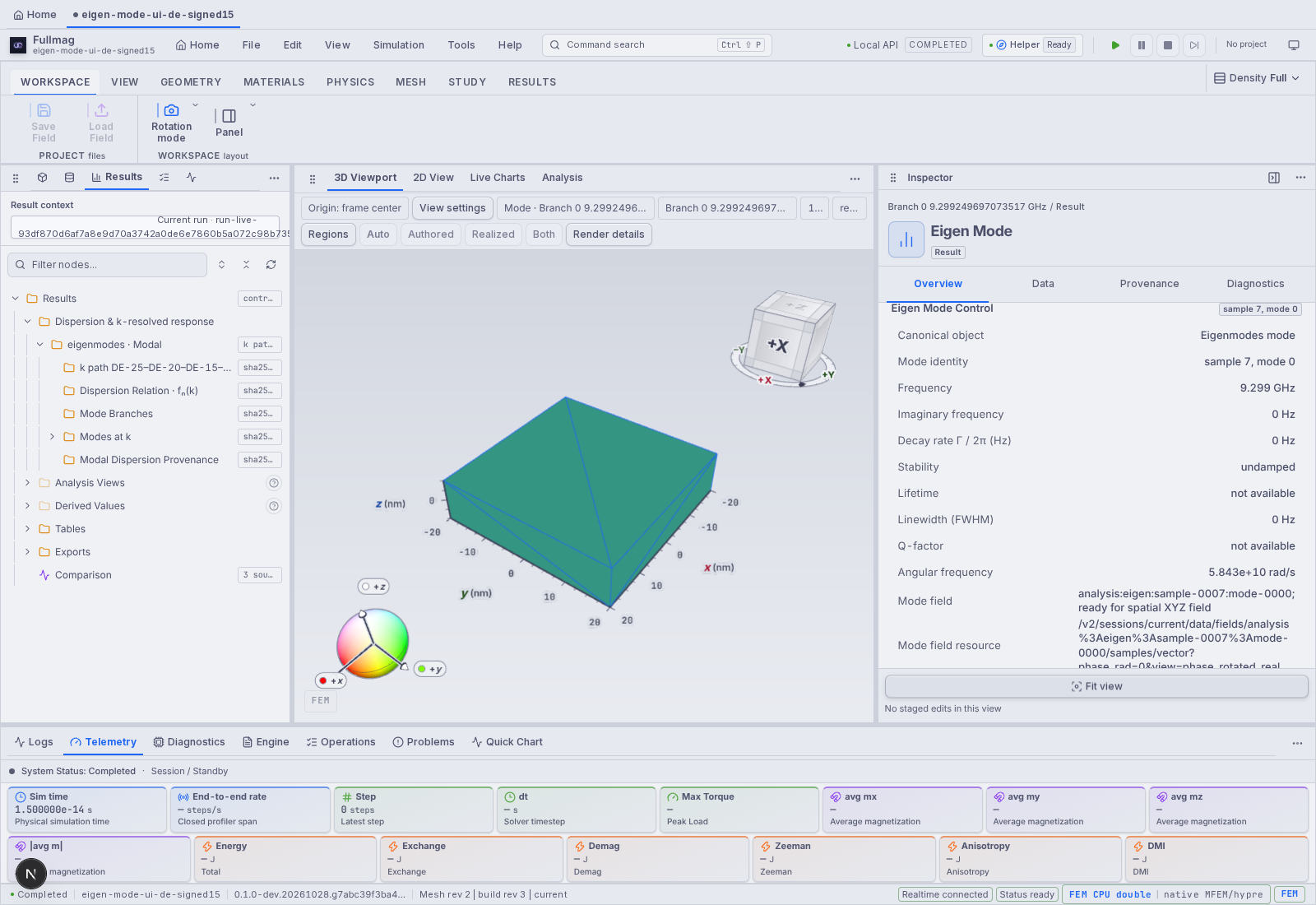
Colour and phase controls reveal the mode; they do not change the eigenproblem that produced it.
FULLMAG · EIGENSOLVE · SEPARATE SOLVER FAMILYE7

Time-domain FFT and eigensolve provide complementary spectra

The bright lines in an FFT depend on how the sample was excited and observed.
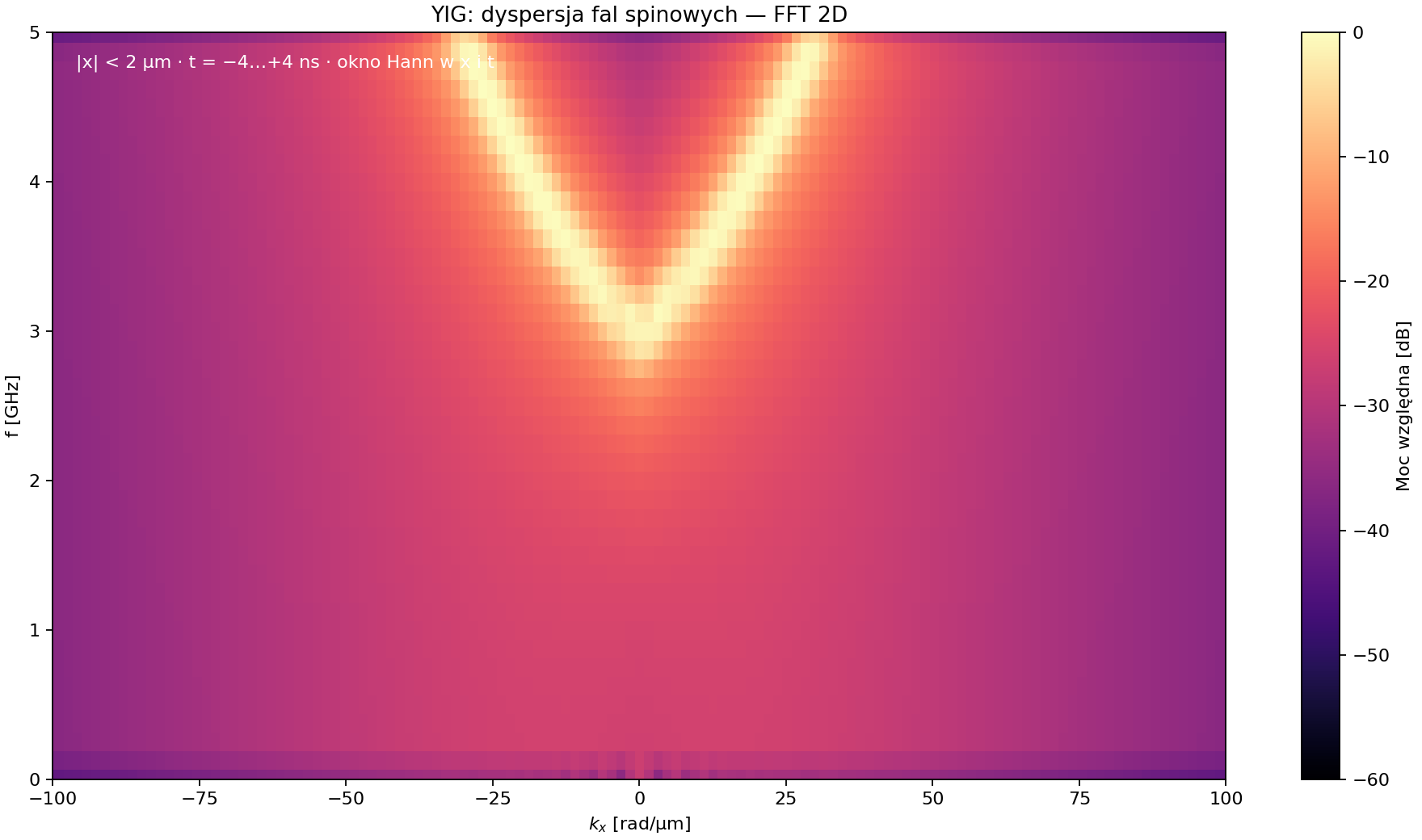
Supplied YIG 2D FFT: frequency versus kₓ, relative power in dB.

Time-domain analysis

  • Excite the system; record m(x,t).
  • Apply declared spatial/time windows and Fourier transform.
  • Finite time and length set spectral resolution; drive overlap sets visible mode strength.

Eigenmode analysis

Find the natural frequencies and spatial eigenvectors directly around equilibrium. A mode can exist even if the chosen antenna couples to it weakly.

A missing bright FFT branch does not prove that the corresponding eigenmode does not exist.
FULLMAG · METHODS & IMPLEMENTATIONF22

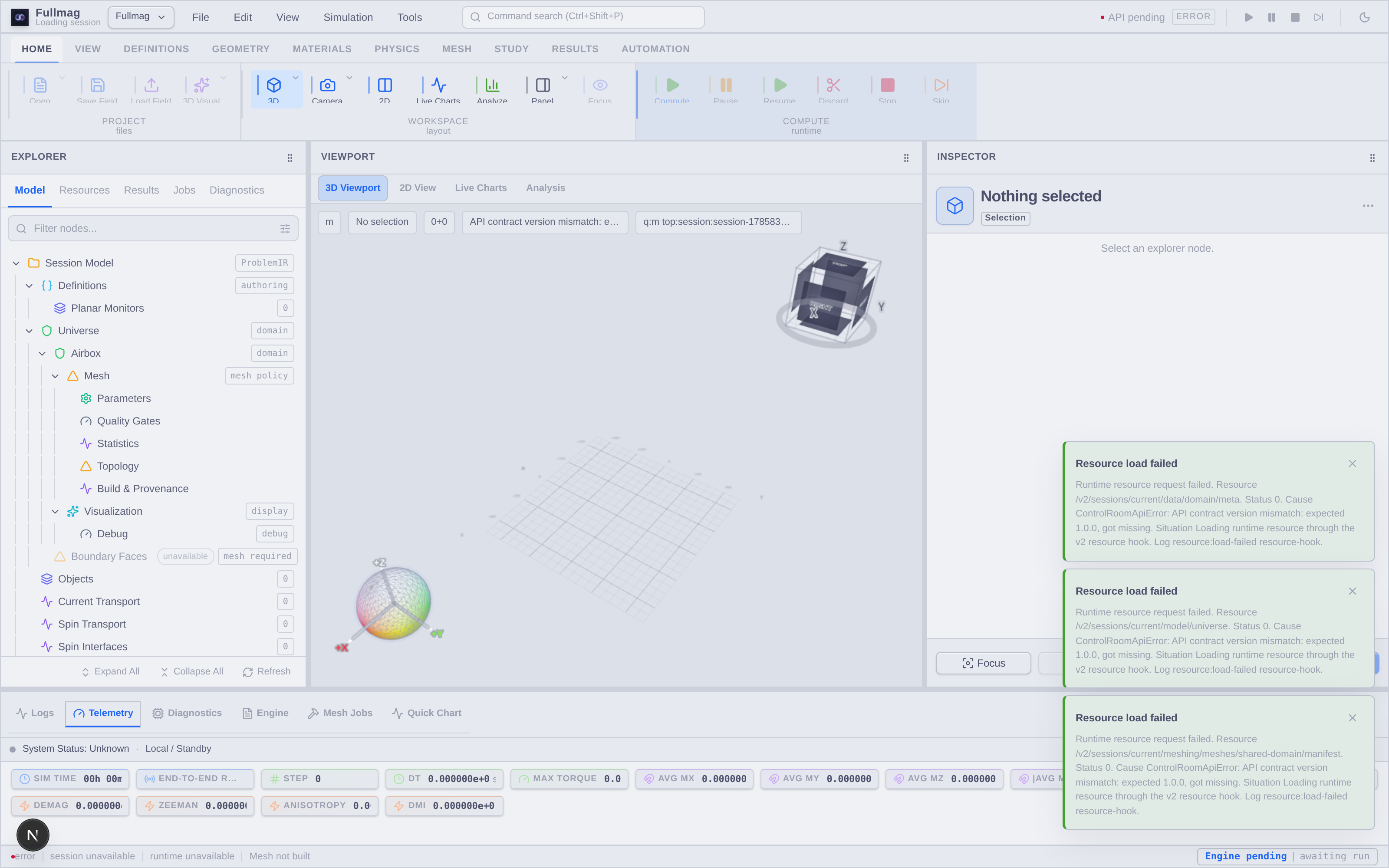
Control Room: follow the scientific object through the workflow

One workspace connects model construction, solver selection and published results.
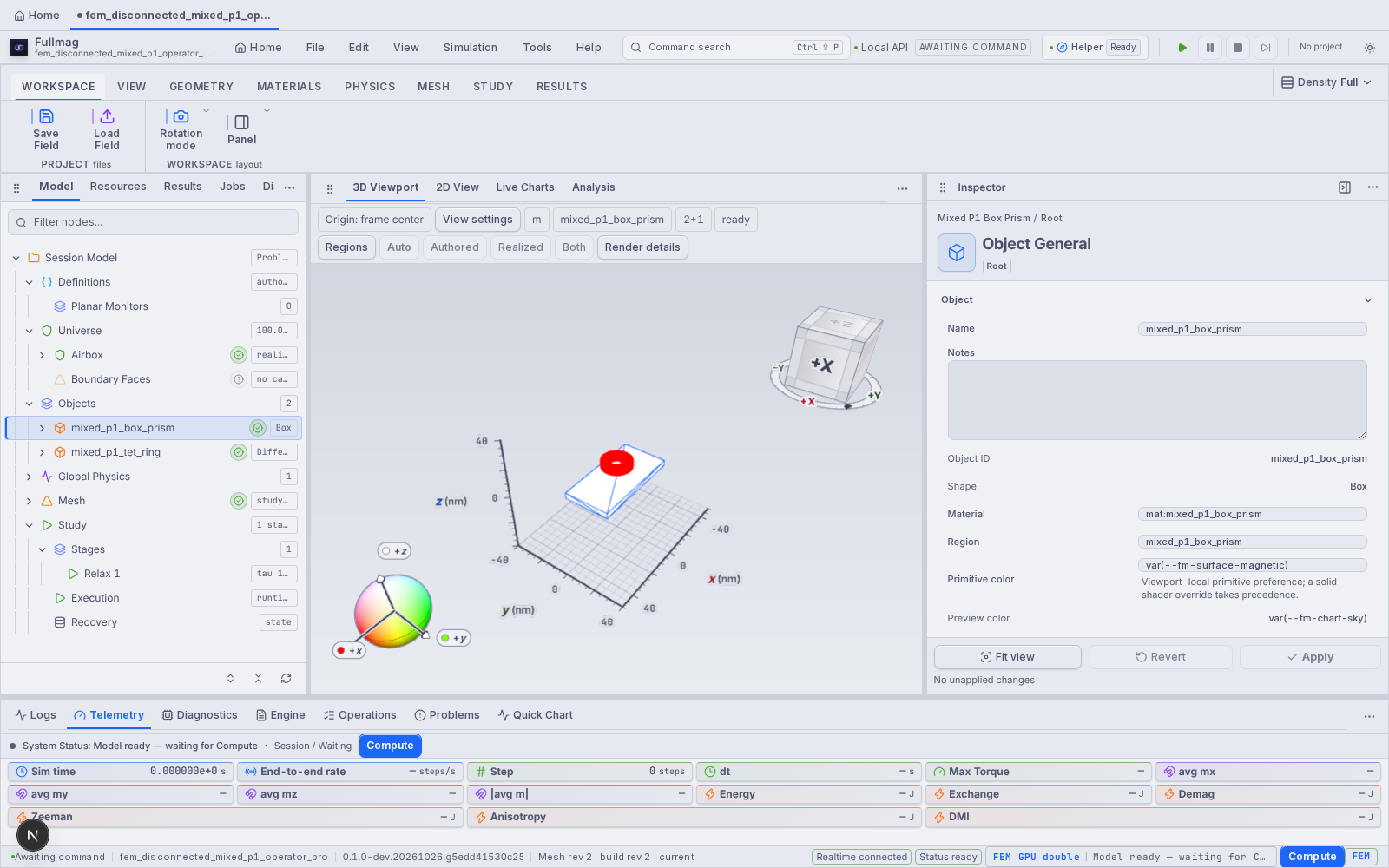
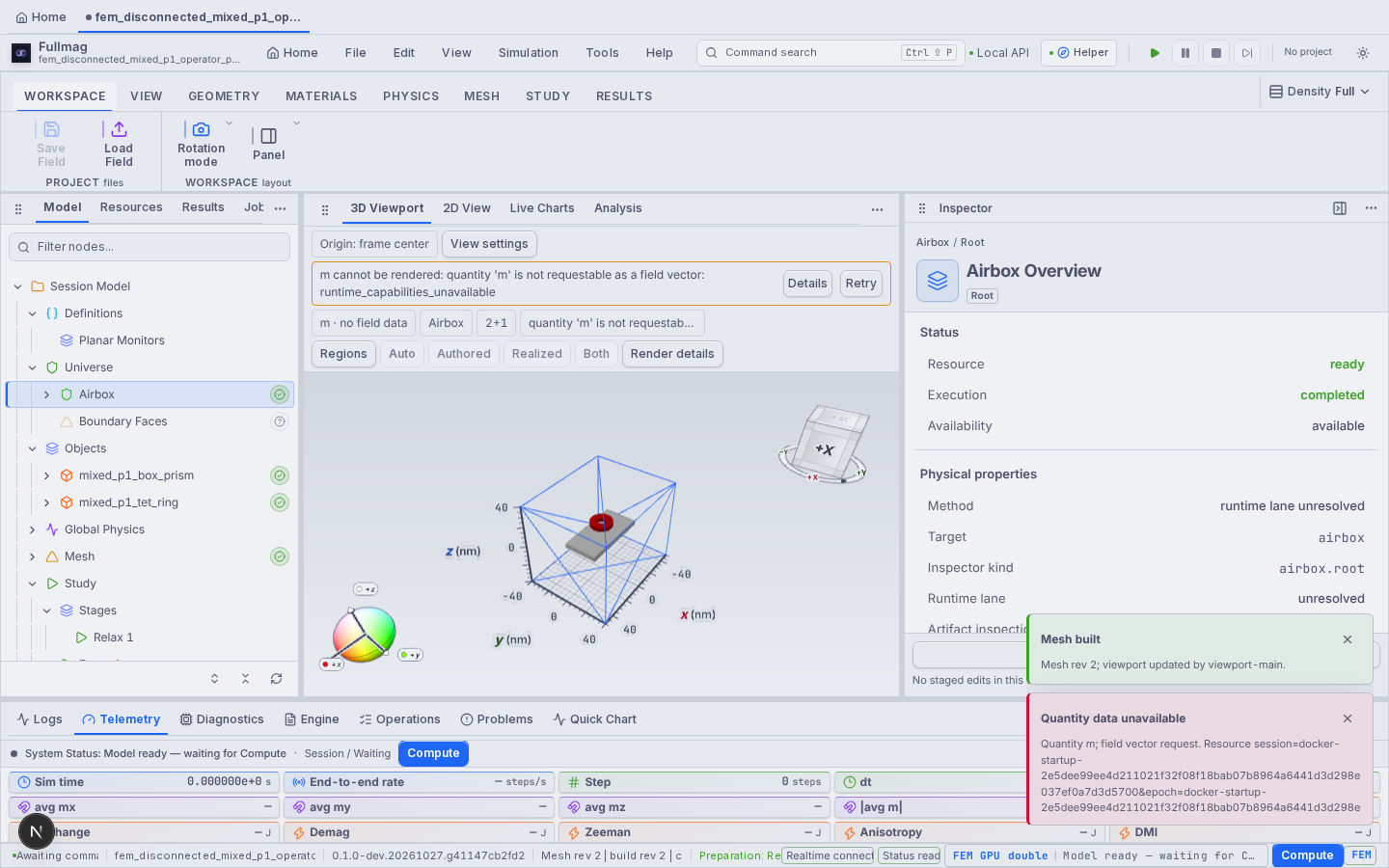
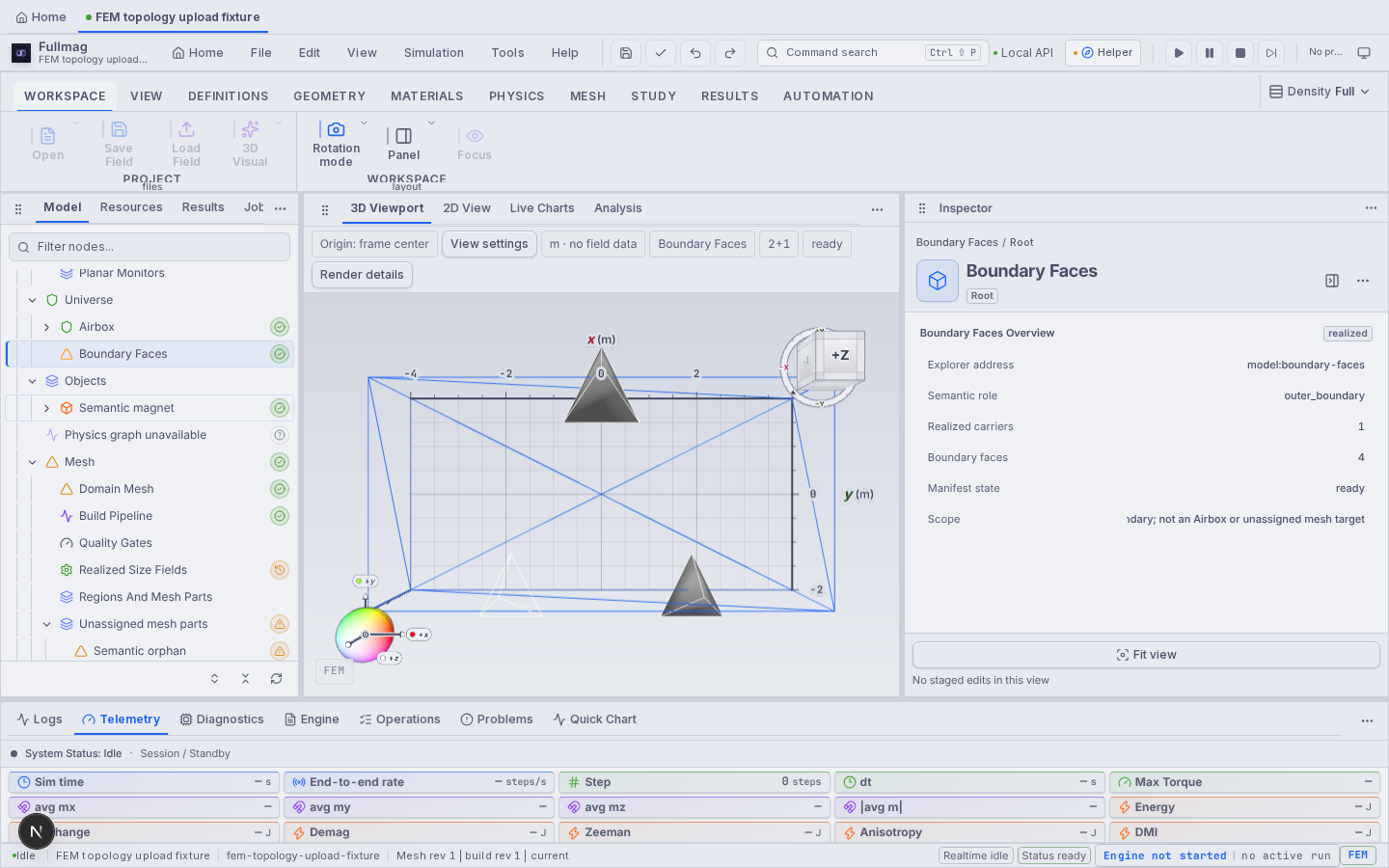
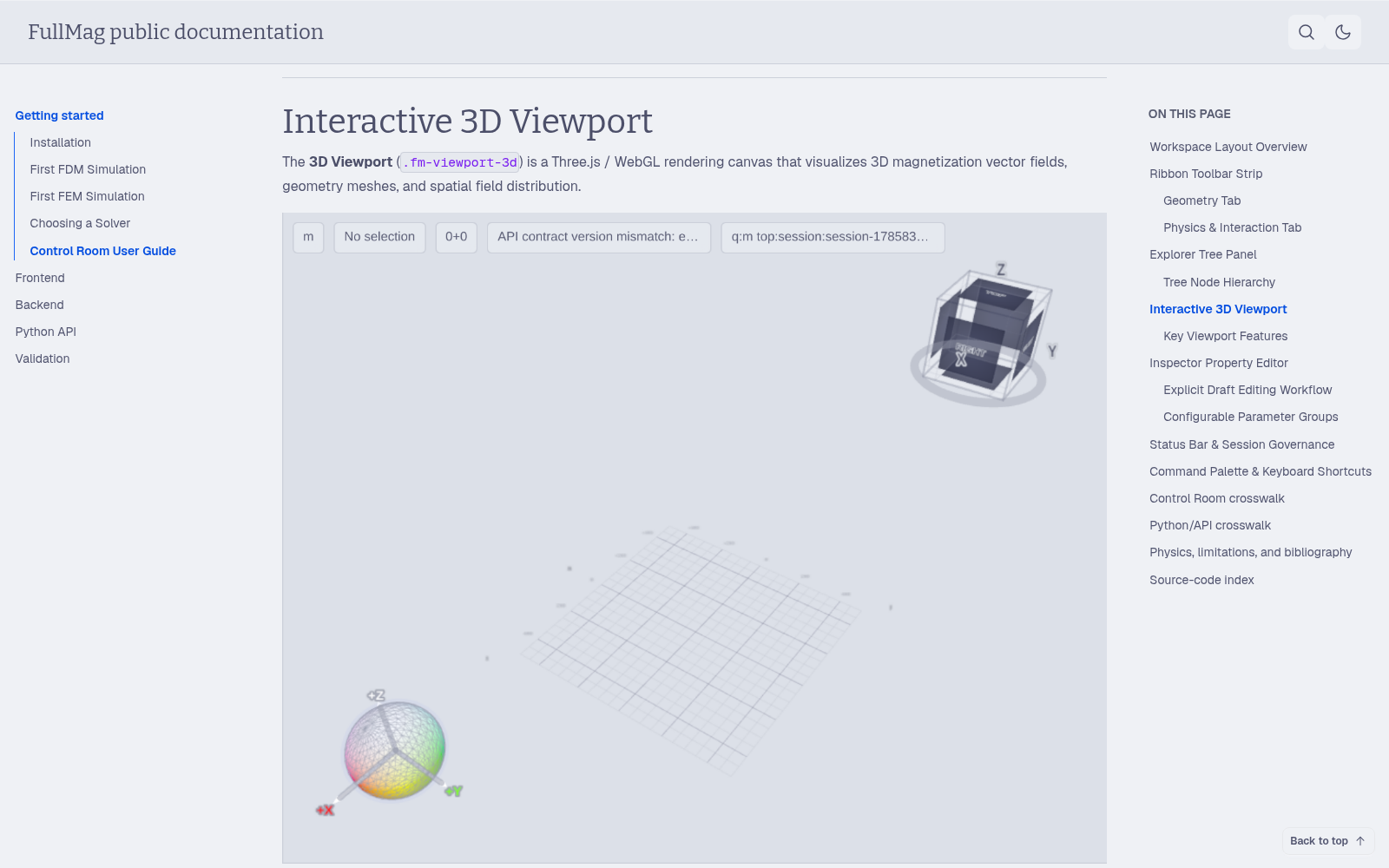
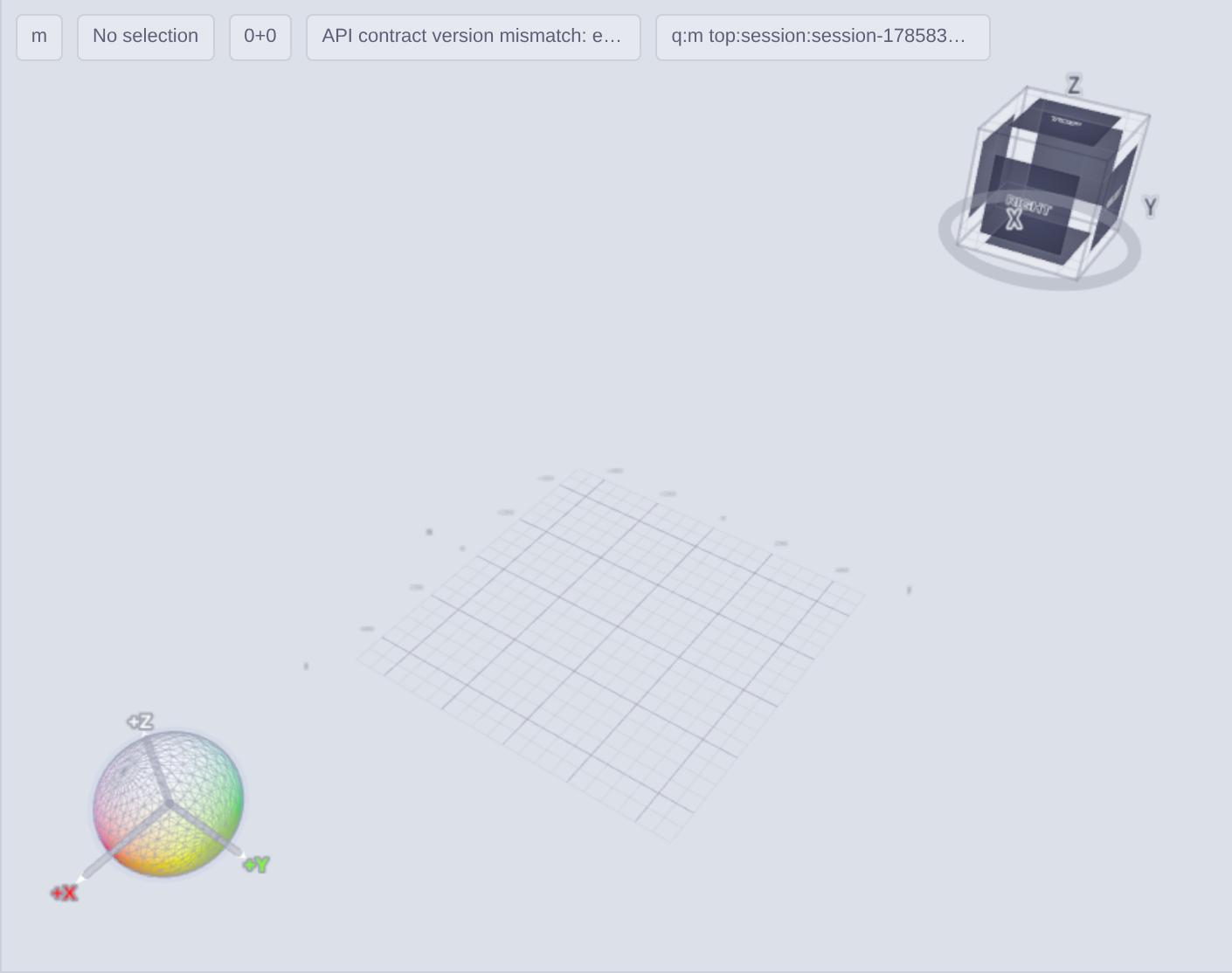
Recorded Fullmag workspace: model tree, central viewport and object inspector.

Three complementary views

  • Explorer: geometry, materials, stages and result products.
  • Viewport: mesh, magnetization and selected physical fields.
  • Inspector: parameters, display controls and result metadata.

Reusable experiment

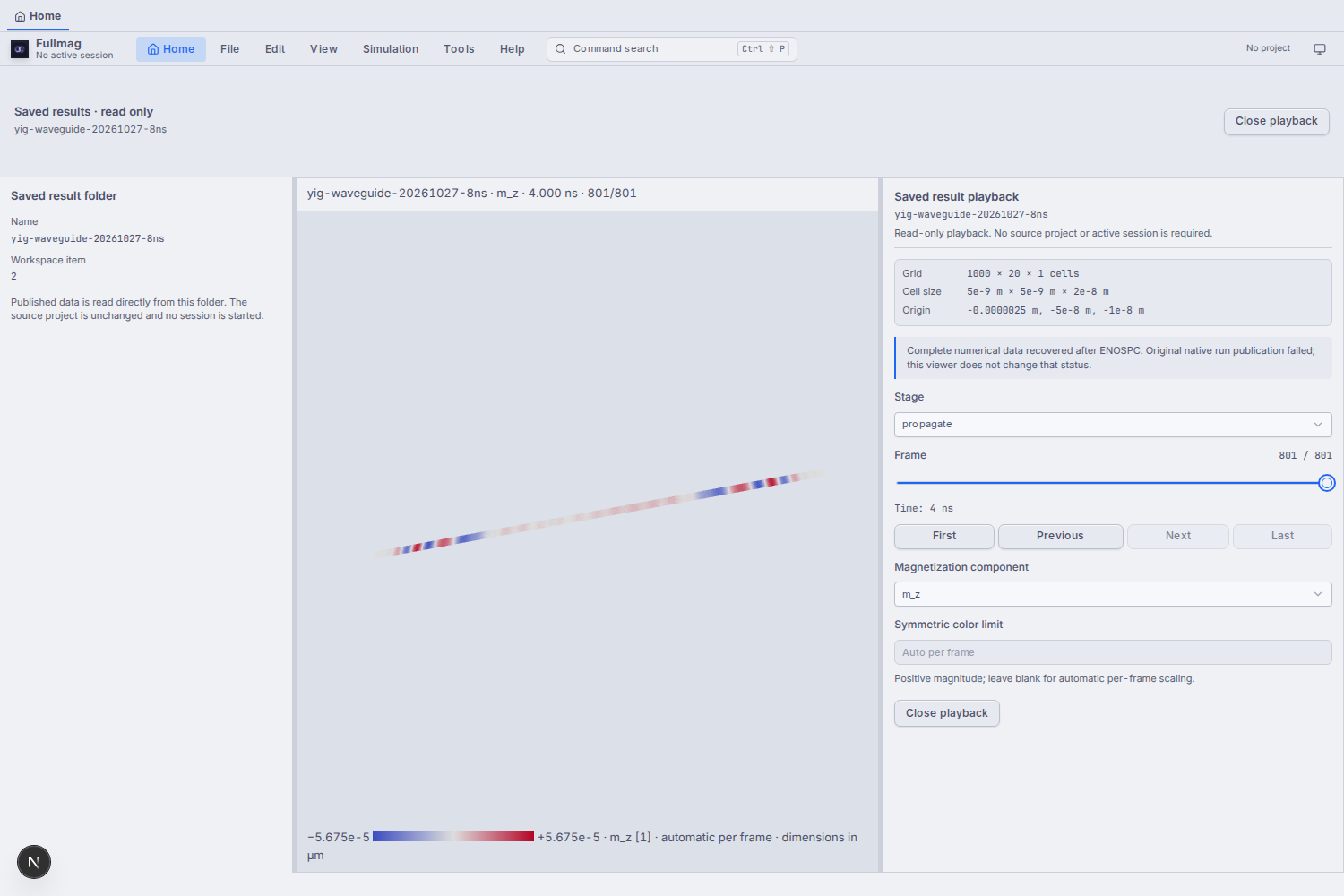
Python and the UI converge on the same problem description. A saved result should remain inspectable after the solver has stopped.
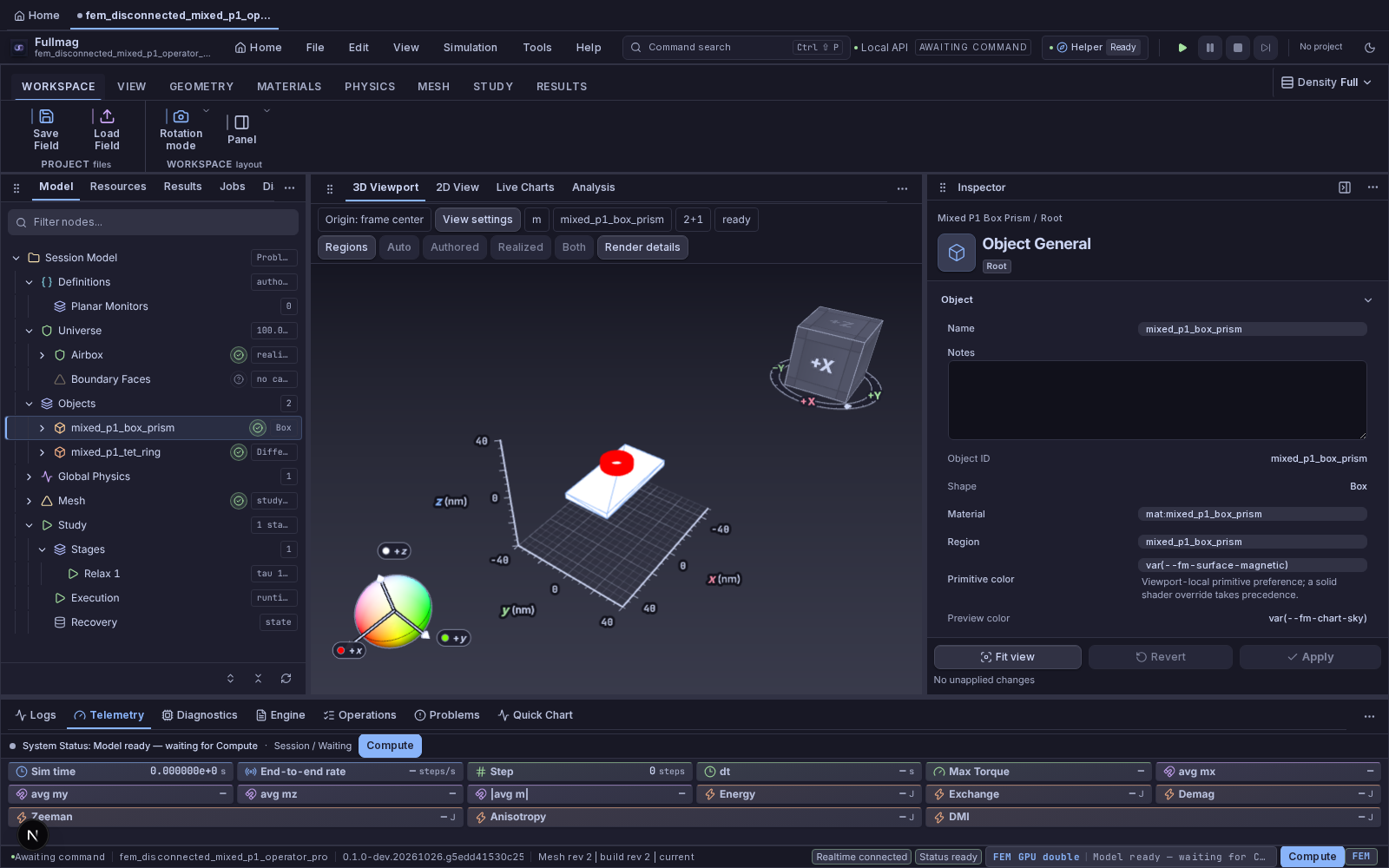

The UI should explain the model and evidence, not hide which numerical method or field is selected.
FULLMAG · METHODS & IMPLEMENTATIONF23

A useful status map: what works, what is being extended

Implementation breadth is real; qualification must remain attached to a named numerical workload.

AreaCurrent source / demonstrated materialDevelopment focus
FDM dynamicsRust CPU reference; CUDA single-grid FP32/FP64; supplied MuMax3 comparisonControlled error metrics and broader matched cases
FDM multilayerOrdered-pair convolution, native geometries and CPU transfers; CUDA componentsDescriptor parity, unequal-thickness end-to-end cases, device qualification
FEM demagAirbox Poisson and hierarchical FK CPU/GPU implementationsPer-realization accuracy, exterior convergence and managed GPU evidence
Interaction coverageConservative fields, rotated DMI, bounded torques/current routesClose workload-specific gaps rather than claim every combination
EigensolveSeparate FEM linearized solver family with boundary/k-path machineryNonzero-k dynamic demag, native sparse paths and mode qualification
WorkflowPython / UI authoring, saved data, dispersion and mode inspectionMake method, units, boundary conditions and provenance visible
Fullmag’s value is the connection between new physical models, numerical choices and inspectable results.
FULLMAG · METHODS & IMPLEMENTATIONF24

What we can do together with Fullmag

Choose a scientific question, then choose the numerical experiment that can answer it.

Geometry and micromagnetics

  • Use FDM for efficient regular films; FEM for geometry-driven questions.
  • Test exchange, anisotropy, demag and chiral terms—including rotated DMI.
  • Compare a controlled case with MuMax3 or a matching FEM formulation.

Excitation and magnonics

  • Compute/inspect a spatial antenna field.
  • Study nonlinear trajectories in time.
  • Use the separate eigensolver to connect dispersion to mode shape.
  • Compare mode predictions with the spectrum excited by a given drive.
Next scientific deliverable: one reproducible geometry, named boundary conditions, selected solver/device, archived inputs/results and quantitative comparison.
The purpose is a research platform we can extend and understand—not a blanket replacement for established tools.
QR code linking to this presentationPresentation available:
presentations.mzelent.pl
/28102026/ai.html
28 OCT 2026 · SOURCE 68b5be5e · SOURCES IN NOTES39:31–40:00